cancel
Showing results for 
Search instead for 
Did you mean: 

Data Days is here! Join us now for 60+ days of learning, challenges, and connection. Learn more

Reply
Anonymous
Not applicable

Viewing Blanks In Indirect Many To Many Relationship

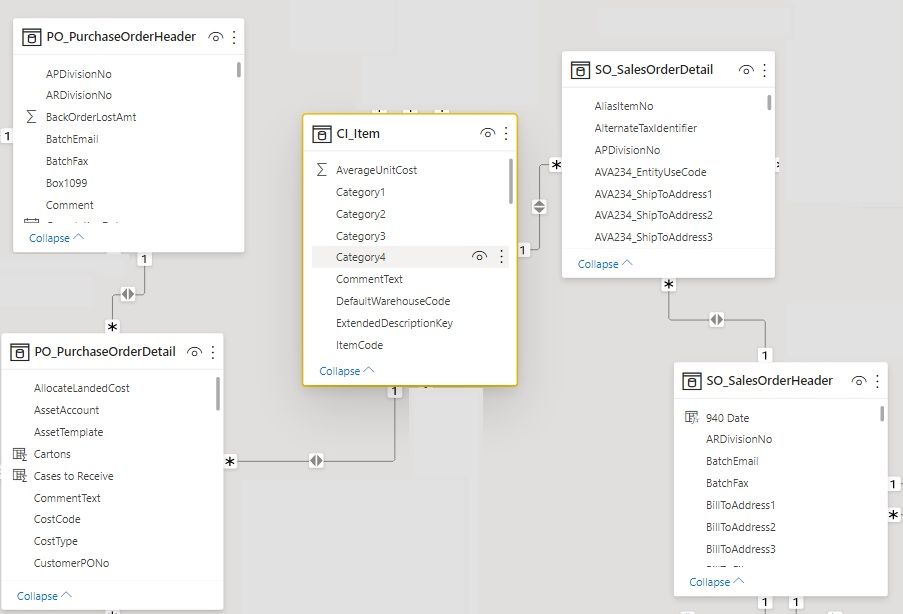
I have an ERD of items (CI_Item) that are contained both in Sales Orders and Purchase Orders, essentially linking them through an item code, creating an indirect many to many relationship (which is expected). This issue I'm having in my report is I have a single table that lists item info and the Sales Orders and Purchase Orders that they are on, and all items are being listed as having both an associated sales and purchase order. I know there are items out there on sales orders that do not have a purchase order. There is no "Blank" values showing up for purchase orders, so I was wondering what can I adjust in the relationships or visuals to show these?


erd.jpg

1 ACCEPTED SOLUTION
Anonymous
Not applicable

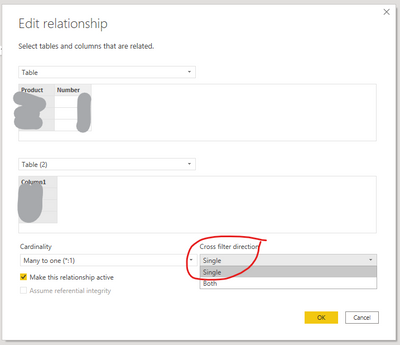
From the diagram you provided, the relationships are one-to-many and not many-to-many which is how they are supposed to be. I believe your problem is not with the relationships but with the "Filter Direction". You should change the "Filter Direction" to One and then make sure the fields in the visual are set to "Show items with no data":

gdarakji_0-1621546282851.png


View solution in original post

2 REPLIES 2
Anonymous
Not applicable

From the diagram you provided, the relationships are one-to-many and not many-to-many which is how they are supposed to be. I believe your problem is not with the relationships but with the "Filter Direction". You should change the "Filter Direction" to One and then make sure the fields in the visual are set to "Show items with no data":

gdarakji_0-1621546282851.png


Anonymous
Not applicable

Thanks! It looks like that "Show items with no data" has resolved it. I did not have that checked on the PO field in my visual.

Helpful resources

Announcements
Fabric Data Days is here Carousel

Fabric Data Days 2026

Don't miss out on Data Days, June 15 through August 7. Learn Fabric, Power BI, SQL, AI and more.

May Power BI Update Carousel

Power BI Monthly Update - May 2026

Check out the May 2026 Power BI update to learn about new features.

Power BI DataViz World Championships carousel

Power BI DataViz World Championships - June 2026

A new Power BI DataViz World Championship is coming this June! Don't miss out on submitting your entry.