cancel
Showing results for 
Search instead for 
Did you mean: 

The Power BI Data Visualization World Championships is back! Get ahead of the game and start preparing now! Learn more

Reply
cjemmott
Advocate IV
Advocate IV

View Data Colors

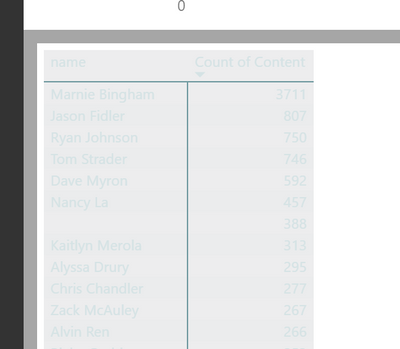
When I click "View Data" on a plot in Power BI I see this:


6.PNG

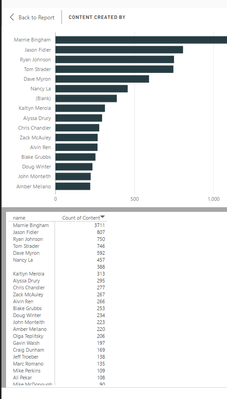
The colors are totally illegible!  When what I want to see is this:


5.PNG


What is super strange is that I see this problem in Desktop intermittently (even on the same plot!), but for all plots in Premium.  I am using a custom theme


{
"name": "cjemmott",
"dataColors": ["#263c42", "#f1592a", "#739ca2", "#dfaf26", "#1ca2dc"],
"background":"#ededee",
"foreground":"#d5e3e5",
"tableAccent": "#739ca2"
}


Is there a way to control these colors?  Why are they acting differently in Power BI desktop and Power BI Premium?


1 ACCEPTED SOLUTION
v-sihou-msft
Microsoft Employee
Microsoft Employee

@cjemmott


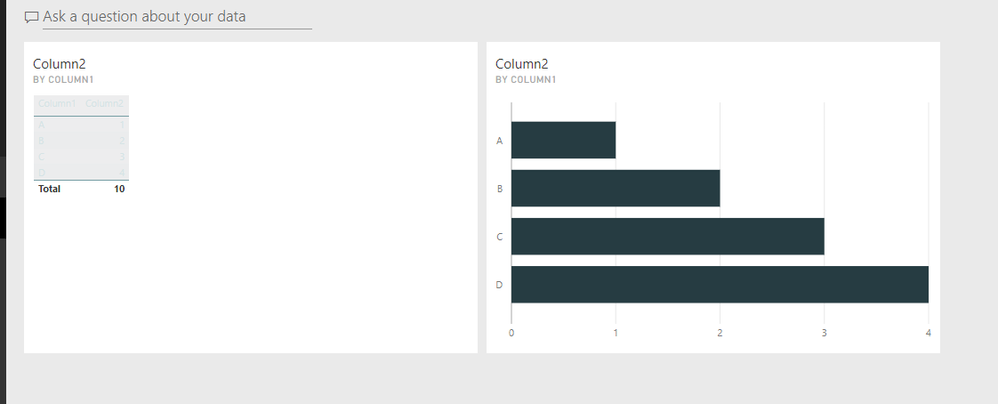
As I tested with your JSON, it shows same "greyed" table visual in both Power BI Desktop.


4.PNG


5.PNG


3.PNG


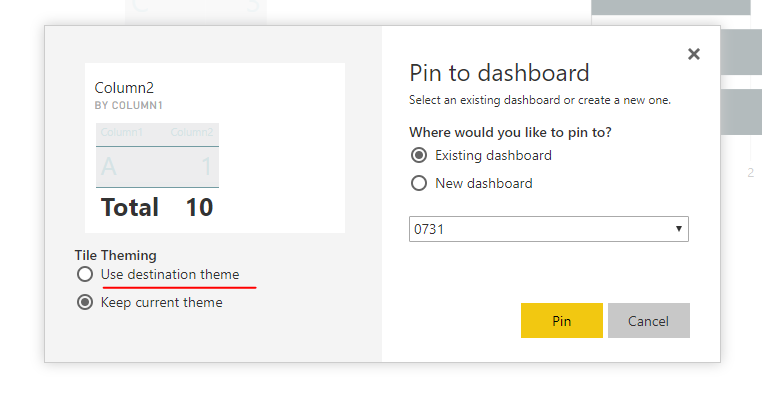
I think this is your expected style from your JSON. And I guess you selected "keep destination theme" when pinning dashboard tiles.


6.PNG


Regards,

View solution in original post

2 REPLIES 2
v-sihou-msft
Microsoft Employee
Microsoft Employee

@cjemmott


As I tested with your JSON, it shows same "greyed" table visual in both Power BI Desktop.


4.PNG


5.PNG


3.PNG


I think this is your expected style from your JSON. And I guess you selected "keep destination theme" when pinning dashboard tiles.


6.PNG


Regards,

Got it!  


I think I may have figured out whay I was confused.


In Desktop I right click on a bar chart in a report and select "see data".  This opens a split screen with the bar plot on the top and a black and white table of the data below that (even with the theme).


I then publish this report to Power BI Premium.  In Premium through the browser do the same thing, right click on the bar chart and select "see data".  The layout is the same, but now the table is the illegible color scheme.


My issue is that desktop and premium are giving different results.  But I did modify the JSON to work around this problem - thanks for the help.

Helpful resources

Announcements
Power BI DataViz World Championships

Power BI Dataviz World Championships

The Power BI Data Visualization World Championships is back! Get ahead of the game and start preparing now!

December 2025 Power BI Update Carousel

Power BI Monthly Update - December 2025

Check out the December 2025 Power BI Holiday Recap!

FabCon Atlanta 2026 carousel

FabCon Atlanta 2026

Join us at FabCon Atlanta, March 16-20, for the ultimate Fabric, Power BI, AI and SQL community-led event. Save $200 with code FABCOMM.

Top Solution Authors