cancel
Showing results for 
Search instead for 
Did you mean: 

Learn from the best! Meet the four finalists headed to the FINALS of the Power BI Dataviz World Championships! Register now

Reply
StuartSmith
Power Participant
Power Participant

View DAX Code behind Filters.

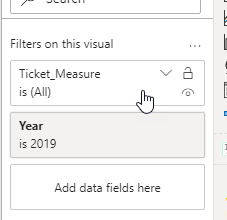
Is there a way to see the code behind filters i apply via the GUI.  As an example, in MS Exchange, you can view the Powershell script of an action you apply via the Exchange GUI, so the next time, you can run the action via Powershell and not Exchange.


Do Power Apps offer the same feature.  A


2020-10-14_15-33-37.png

1 ACCEPTED SOLUTION
blopez11
Super User
Super User

Yes

If you enable the "Performance Analyzer" in the desktop

- go to View tab, then select "Performance analyzer" in the "Show panes" group


Go to the tab that your visual in question resides in


In the "Performance analyzer" pane, select "Start recording", then "Refresh visuals", then "Stop"


You should find your visual under the Name column, then expand the group and select "Copy query"


That query will show you the query used for the visual and you should find how the "Filters on this visual" is used


Good luck,

View solution in original post

2 REPLIES 2
blopez11
Super User
Super User

Yes

If you enable the "Performance Analyzer" in the desktop

- go to View tab, then select "Performance analyzer" in the "Show panes" group


Go to the tab that your visual in question resides in


In the "Performance analyzer" pane, select "Start recording", then "Refresh visuals", then "Stop"


You should find your visual under the Name column, then expand the group and select "Copy query"


That query will show you the query used for the visual and you should find how the "Filters on this visual" is used


Good luck,

Thanks


Helpful resources

Announcements
Join our Fabric User Panel

Join our Fabric User Panel

Share feedback directly with Fabric product managers, participate in targeted research studies and influence the Fabric roadmap.

March Power BI Update Carousel

Power BI Community Update - March 2026

Check out the March 2026 Power BI update to learn about new features.