
Join us at FabCon Atlanta from March 16 - 20, 2026, for the ultimate Fabric, Power BI, AI and SQL community-led event. Save $200 with code FABCOMM.
Register now!The Power BI Data Visualization World Championships is back! Get ahead of the game and start preparing now! Learn more
I have a desktop shared power bi data model (no reports or visuals) which has become very slow, for example, when clicking add new measure, it shows "working on it" for a few minutes (before the measure has even been typed), its so slow it is impossible to add a measure without going through tabular editor, which instantly adds the measure. The model is all import - but not doing a refresh, just opening the model on desktop causes the issue.
Are there any suggestions as to what can be causing this and what settings I can adjust to fix the issue?
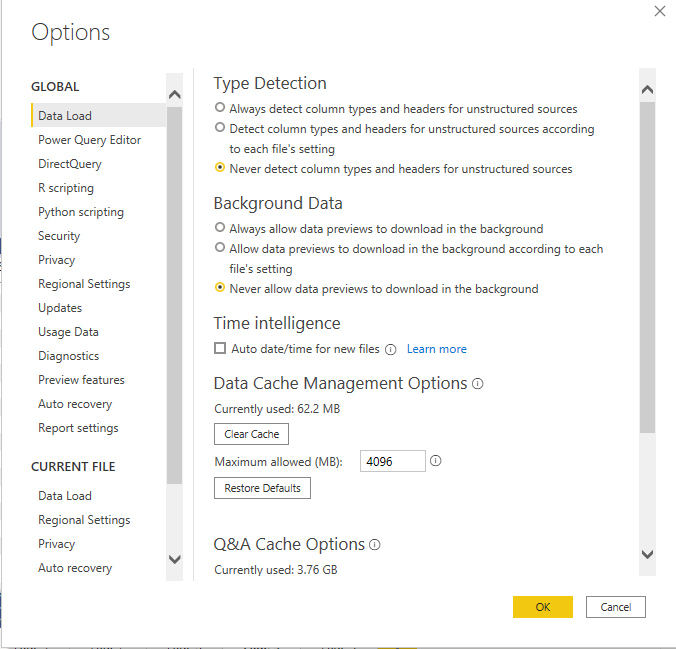
Auto data/time is off, as is Q&A, cache and Data load settings are default.
Using DAX Studio, the Total size in Memory is only 246 MB. I have the latest version of desktop, running off an intel core i7 laptop with 16GB of RAM on windows 11.
@amitchandak thank you so much for your reply and suggestions - I have tried all of these but the problem remains, are there any others that perhaps may solve it?
@Kletzy , 1. You can go and increase Data Cache (8-10 GB) Under file -> Options & Settings -> Options.
2. Pause visual under optimize
Prefer to load fewer data on desktop and more on service. Refer these from GuyinaCube
https://www.youtube.com/watch?v=qZOEDBedATA
https://www.youtube.com/watch?v=c-ZqToc85Yc
https://www.youtube.com/watch?v=_zYvybVMk7k
Check out the November 2025 Power BI update to learn about new features.
Advance your Data & AI career with 50 days of live learning, contests, hands-on challenges, study groups & certifications and more!