cancel
Showing results for 
Search instead for 
Did you mean: 

The Power BI Data Visualization World Championships is back! Get ahead of the game and start preparing now! Learn more

Reply
critchie
New Member

Very Simple Question

Hi 


I am a new user of Power BI.  I have a very simple table tracking x number of devices, that have been upgraded (status = complete/scheduled), on a particular date and in a particular country.


I would like to use Power BI to improve my statis excel charts.


I would like to create a couple of charts:

1.  the number of devices completed vs scheduled - bar chart.

2.  the number of devices completed and scheduled per a particular week, potentially with a trend line

3.  a treemap of the number of devices per a country (complete + scheduled


I would very much appreciate some assistance, without the need to code the solution.


Thank you

Chris


1 ACCEPTED SOLUTION
v-qiuyu-msft
Community Support
Community Support

Hi @critchie,


Based on your description, I create some sample data to plot chats:


q1.PNG


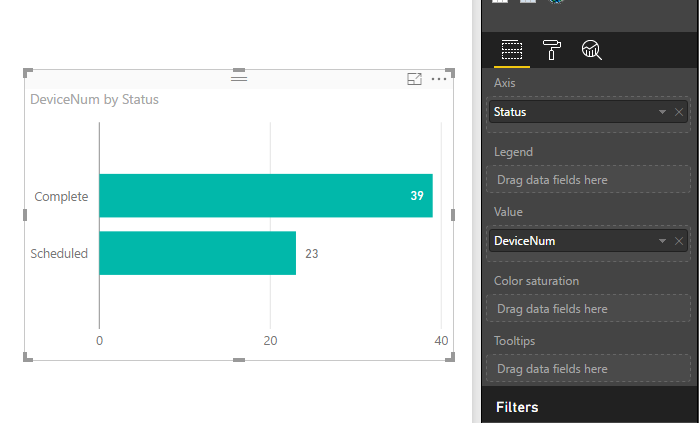
1.  You can create a bar chart like below:

q2.PNG


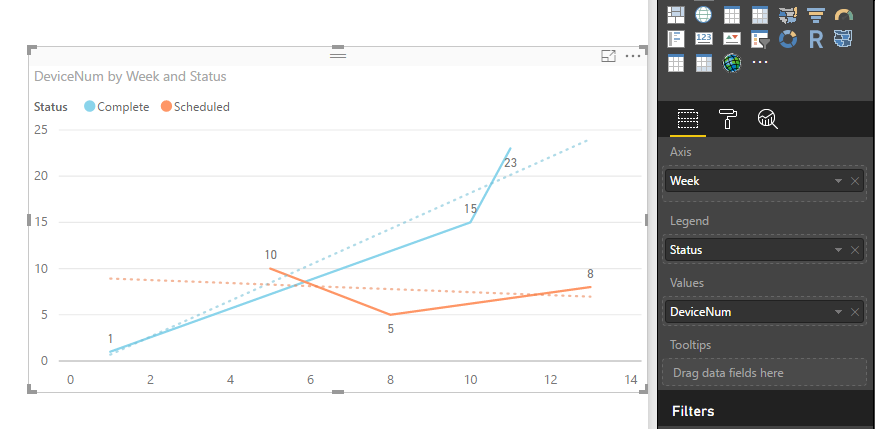
2. Create a calendar table, add a calculated column to return week values. Create a relationship between the calendar table and fact table. Add a trend line in a line chart. See: Analytics pane in Power BI Desktop.


q3.PNG


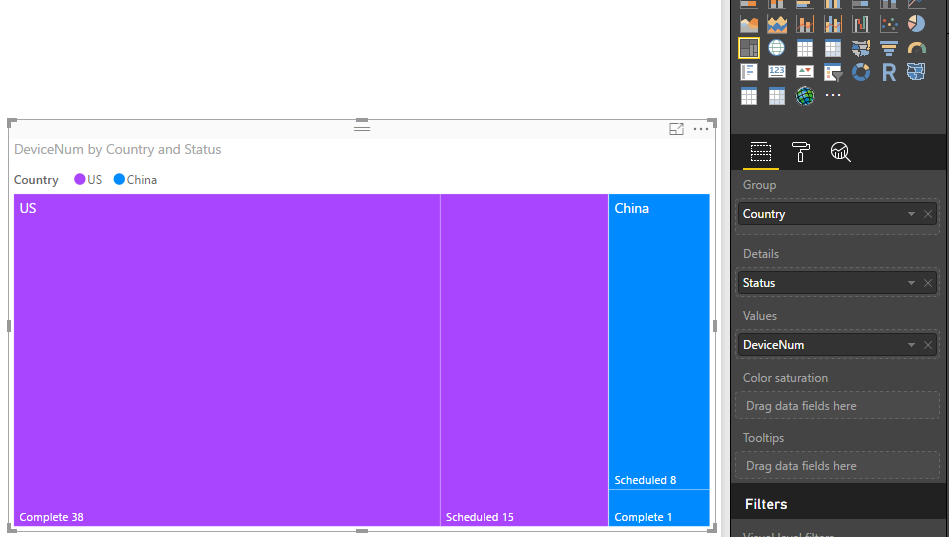
3. Create a treemap like below. See: Treemaps in Power BI (Tutorial).

q4.PNG


For detail steps, you can download attached .pbix file to have a look.


Best Regards,
Qiuyun Yu


Community Support Team _ Qiuyun Yu
If this post helps, then please consider Accept it as the solution to help the other members find it more quickly.

View solution in original post

4 REPLIES 4
v-qiuyu-msft
Community Support
Community Support

Hi @critchie,


Based on your description, I create some sample data to plot chats:


q1.PNG


1.  You can create a bar chart like below:

q2.PNG


2. Create a calendar table, add a calculated column to return week values. Create a relationship between the calendar table and fact table. Add a trend line in a line chart. See: Analytics pane in Power BI Desktop.


q3.PNG


3. Create a treemap like below. See: Treemaps in Power BI (Tutorial).

q4.PNG


For detail steps, you can download attached .pbix file to have a look.


Best Regards,
Qiuyun Yu


Community Support Team _ Qiuyun Yu
If this post helps, then please consider Accept it as the solution to help the other members find it more quickly.

Hello Qiuyun  (you have a very interesting name 😉 )


Thank you for your assistance!  


This has massively helped me to improve my dashboard.  Especially the calendar week table.


Kind regards

Chris

Hi @critchie,


You're welcome. Smiley Very Happy Hope you can have fun with Power BI.


Best Regards,
Qiuyun Yu


Community Support Team _ Qiuyun Yu
If this post helps, then please consider Accept it as the solution to help the other members find it more quickly.
vanessafvg
Super User
Super User

i suggest going through the guided learning videos on the power Bi site, thats the best way to learn


https://powerbi.microsoft.com/en-us/guided-learning/


If I took the time to answer your question and I came up with a solution, please mark my post as a solution and /or give kudos freely for the effort 🙂 Thank you!

Proud to be a Super User!


Helpful resources

Announcements
Power BI DataViz World Championships

Power BI Dataviz World Championships

The Power BI Data Visualization World Championships is back! Get ahead of the game and start preparing now!

December 2025 Power BI Update Carousel

Power BI Monthly Update - December 2025

Check out the December 2025 Power BI Holiday Recap!

FabCon Atlanta 2026 carousel

FabCon Atlanta 2026

Join us at FabCon Atlanta, March 16-20, for the ultimate Fabric, Power BI, AI and SQL community-led event. Save $200 with code FABCOMM.