
Join us at FabCon Atlanta from March 16 - 20, 2026, for the ultimate Fabric, Power BI, AI and SQL community-led event. Save $200 with code FABCOMM.
Register now!The Power BI Data Visualization World Championships is back! Get ahead of the game and start preparing now! Learn more
Hi All:
I have the below data set that references volunteerism in January of 2016 & 2017. Can someone show me how to get the variance to display. I want to see that the difference between hours volunteered in 2016 & 2017 is '1186'.
Solved! Go to Solution.
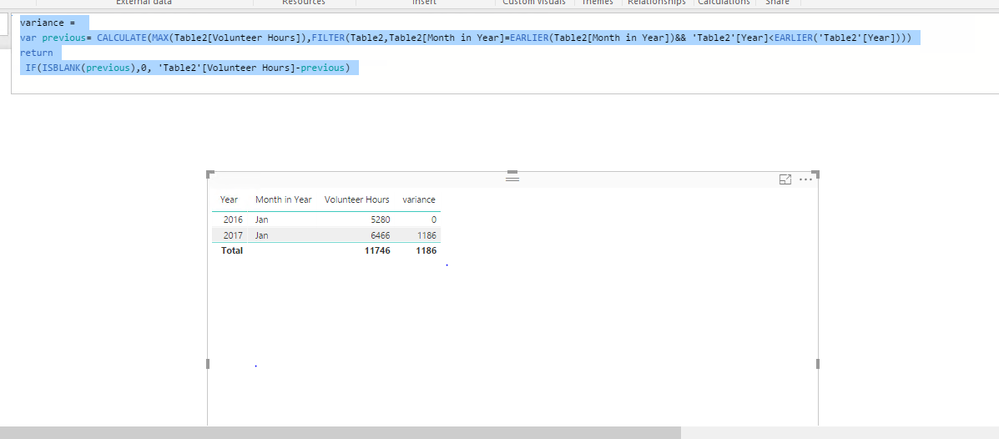
Create a column using DAX below.
variance =
var previous= CALCULATE(MAX(Table2[Volunteer Hours]),FILTER(Table2,Table2[Month in Year]=EARLIER(Table2[Month in Year])&& 'Table2'[Year]<EARLIER('Table2'[Year])))
return
IF(ISBLANK(previous),0, 'Table2'[Volunteer Hours]-previous)
If you get any issues, please share table structure with raw data.
Regards,
Create a column using DAX below.
variance =
var previous= CALCULATE(MAX(Table2[Volunteer Hours]),FILTER(Table2,Table2[Month in Year]=EARLIER(Table2[Month in Year])&& 'Table2'[Year]<EARLIER('Table2'[Year])))
return
IF(ISBLANK(previous),0, 'Table2'[Volunteer Hours]-previous)
If you get any issues, please share table structure with raw data.
Regards,
for some reason this formula isnt working or recognizing my table for calendar? I have the hours information that you seen in my original post and I have a table that I built that has the calendar details... do you know what could be causing this to arise?
@nmck86,
Right click your table, select New Column and put the DAX there.
Regards,
The Power BI Data Visualization World Championships is back! Get ahead of the game and start preparing now!
| User | Count |
|---|---|
| 40 | |
| 35 | |
| 34 | |
| 31 | |
| 28 |
| User | Count |
|---|---|
| 137 | |
| 102 | |
| 71 | |
| 67 | |
| 65 |