
Join us at FabCon Atlanta from March 16 - 20, 2026, for the ultimate Fabric, Power BI, AI and SQL community-led event. Save $200 with code FABCOMM.
Register now!The Power BI Data Visualization World Championships is back! It's time to submit your entry. Live now!
Hi All:
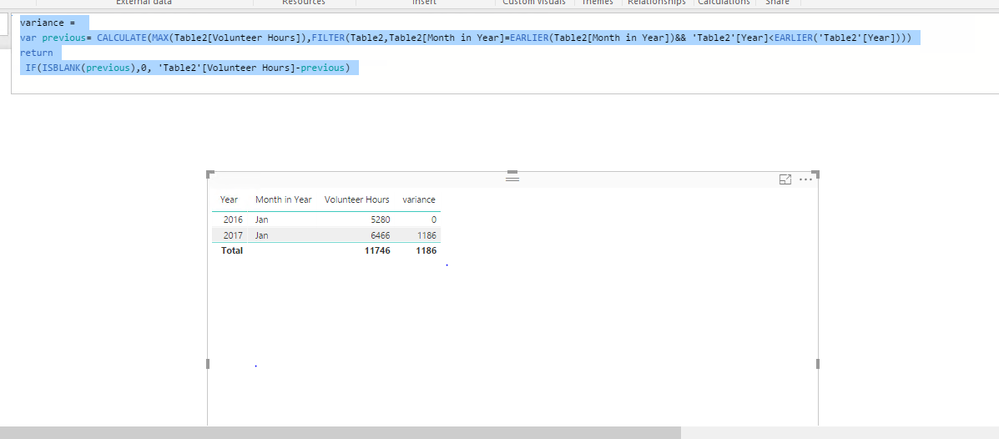
I have the below data set that references volunteerism in January of 2016 & 2017. Can someone show me how to get the variance to display. I want to see that the difference between hours volunteered in 2016 & 2017 is '1186'.
Solved! Go to Solution.
Create a column using DAX below.
variance =
var previous= CALCULATE(MAX(Table2[Volunteer Hours]),FILTER(Table2,Table2[Month in Year]=EARLIER(Table2[Month in Year])&& 'Table2'[Year]<EARLIER('Table2'[Year])))
return
IF(ISBLANK(previous),0, 'Table2'[Volunteer Hours]-previous)
If you get any issues, please share table structure with raw data.
Regards,
Create a column using DAX below.
variance =
var previous= CALCULATE(MAX(Table2[Volunteer Hours]),FILTER(Table2,Table2[Month in Year]=EARLIER(Table2[Month in Year])&& 'Table2'[Year]<EARLIER('Table2'[Year])))
return
IF(ISBLANK(previous),0, 'Table2'[Volunteer Hours]-previous)
If you get any issues, please share table structure with raw data.
Regards,
for some reason this formula isnt working or recognizing my table for calendar? I have the hours information that you seen in my original post and I have a table that I built that has the calendar details... do you know what could be causing this to arise?
@nmck86,
Right click your table, select New Column and put the DAX there.
Regards,
The Power BI Data Visualization World Championships is back! It's time to submit your entry.
| User | Count |
|---|---|
| 49 | |
| 42 | |
| 36 | |
| 33 | |
| 30 |
| User | Count |
|---|---|
| 138 | |
| 120 | |
| 60 | |
| 59 | |
| 56 |