cancel
Showing results for 
Search instead for 
Did you mean: 

The Power BI Data Visualization World Championships is back! Get ahead of the game and start preparing now! Learn more

Reply
samnaw
Resolver I
Resolver I

Variance Calculation Question

Not sure if there is a solution to this or not:


This is how my DAX formula is for varience:

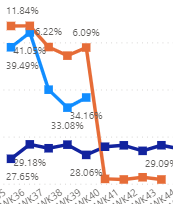
measures = [Light Blue DAX formula] - [Dark Blue DAX formula] 


The reason why the orange line drops of because there is no data for WK40 (Light Blue Line). So it calculates as only Dark Blue Line. Variance = -28%. 


For a number of reason I dont want to adjust my Dark Blue line DAX formual. Is there any way I can adjust my Varience DAX formula so if light Blue line = 0% it stops calculating. Not sure if there is a solution to this or not. 


samnaw_0-1666891448956.png


2 REPLIES 2
Anonymous
Not applicable

Hi @samnaw ,

Did the pbi-novice's answer helped you? If so, please consider marking the most helpful answer as a solution, as this will help people searching the forum for similar questions in the future to find answers more quickly. Thanks in advance!


Or please try:

Measures =
IF (
    [Ligth Blue DAX Formula] = BLANK (),
    BLANK (),
    [Ligth Blue DAX Formula] - [Dark Blue DAX Formula]
)

Best Regards,
Gao

Community Support Team


If there is any post helps, then please consider Accept it as the solution  to help the other members find it more quickly. If I misunderstand your needs or you still have problems on it, please feel free to let us know. Thanks a lot!

How to get your questions answered quickly -- How to provide sample data

pbi-novice
Helper I
Helper I

Have you tried using IF?


IF([Ligth Blue DAX Formula] = 0%, BLANK(), [Ligth Blue DAX Formula]-[Dark Blue DAX Formula])


This might change depending on whether the value for Light Blue line is BLANK or 0%.

Helpful resources

Announcements
Power BI DataViz World Championships

Power BI Dataviz World Championships

The Power BI Data Visualization World Championships is back! Get ahead of the game and start preparing now!

December 2025 Power BI Update Carousel

Power BI Monthly Update - December 2025

Check out the December 2025 Power BI Holiday Recap!

FabCon Atlanta 2026 carousel

FabCon Atlanta 2026

Join us at FabCon Atlanta, March 16-20, for the ultimate Fabric, Power BI, AI and SQL community-led event. Save $200 with code FABCOMM.