Don't miss your chance to take the Fabric Data Engineer (DP-600) exam for FREE! Find out how by attending the DP-600 session on April 23rd (pacific time), live or on-demand.
Learn moreNext up in the FabCon + SQLCon recap series: The roadmap for Microsoft SQL and Maximizing Developer experiences in Fabric. All sessions are available on-demand after the live show. Register now
Not sure if there is a solution to this or not:
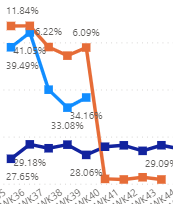
This is how my DAX formula is for varience:
measures = [Light Blue DAX formula] - [Dark Blue DAX formula]
The reason why the orange line drops of because there is no data for WK40 (Light Blue Line). So it calculates as only Dark Blue Line. Variance = -28%.
For a number of reason I dont want to adjust my Dark Blue line DAX formual. Is there any way I can adjust my Varience DAX formula so if light Blue line = 0% it stops calculating. Not sure if there is a solution to this or not.
Hi @samnaw ,
Did the pbi-novice's answer helped you? If so, please consider marking the most helpful answer as a solution, as this will help people searching the forum for similar questions in the future to find answers more quickly. Thanks in advance!
Or please try:
Measures =
IF (
[Ligth Blue DAX Formula] = BLANK (),
BLANK (),
[Ligth Blue DAX Formula] - [Dark Blue DAX Formula]
)
Best Regards,
Gao
Community Support Team
If there is any post helps, then please consider Accept it as the solution to help the other members find it more quickly. If I misunderstand your needs or you still have problems on it, please feel free to let us know. Thanks a lot!
How to get your questions answered quickly -- How to provide sample data
Have you tried using IF?
IF([Ligth Blue DAX Formula] = 0%, BLANK(), [Ligth Blue DAX Formula]-[Dark Blue DAX Formula])
This might change depending on whether the value for Light Blue line is BLANK or 0%.
If you have recently started exploring Fabric, we'd love to hear how it's going. Your feedback can help with product improvements.
A new Power BI DataViz World Championship is coming this June! Don't miss out on submitting your entry.
| User | Count |
|---|---|
| 44 | |
| 43 | |
| 38 | |
| 19 | |
| 15 |
| User | Count |
|---|---|
| 68 | |
| 64 | |
| 31 | |
| 29 | |
| 24 |