Join us at FabCon Atlanta from March 16 - 20, 2026, for the ultimate Fabric, Power BI, AI and SQL community-led event. Save $200 with code FABCOMM.
Register now!The Power BI Data Visualization World Championships is back! It's time to submit your entry. Live now!
I'm wondering if I can replace a piece of code in the advanced editor with a parameter (or something else) that contents the same piece of code. For example, if I want to change the type of each column:
1) This is the line recorded by Power Query Editor, and I want to replace the bolded code with a parameter (because the numbers of columns can change in this query, and also the columns name can change):
#"Changed Type" = Table.TransformColumnTypes(#"Promoted Headers", {{""Etap"", Int64.Type}, {""Ser."", Int64.Type}, {""Bloq"", Int64.Type}}),
2) Then I create a text parameter, named Parameter1, with the following value:
{{""Etap"", Int64.Type}, {""Ser."", Int64.Type}, {""Bloq"", Int64.Type}}
3) And try to replace the parameter in the advanced editor line (I'm not sure of the syntax):
#"Changed Type" = Table.TransformColumnTypes(#"Promoted Headers", Parameter1),
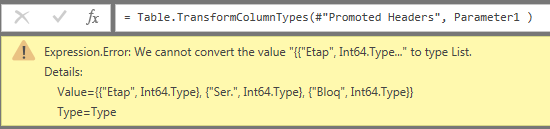
4) But this error message is displayed:
Let me know if there is any other way to replace a piece of code with something else instead of a parameter. Mainly because I have a variable number of columns in a query.
Thank you in advance for your help.
Solved! Go to Solution.
Hi @e17aguilar,
Based on my test, you could refer to below steps:
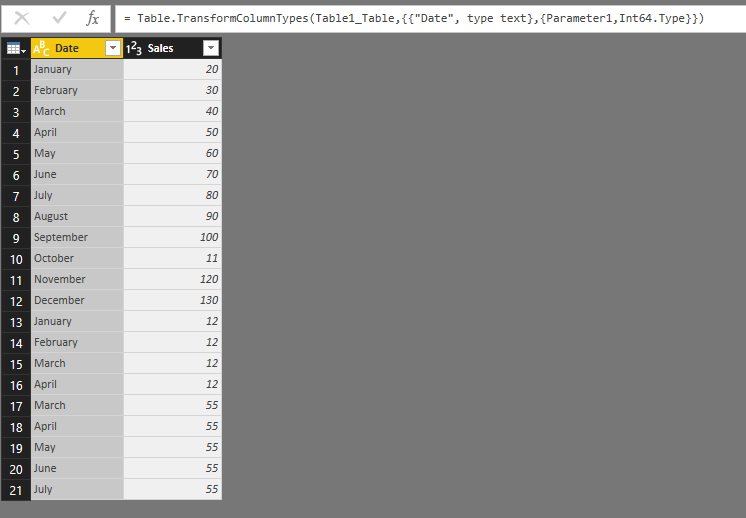
Create the parameter in the query editor and just enter the column name like the picture below:
Modify the code in the advanced language:
Now you could see the result.
Regards,
Daniel He
Hi Daniel,
Many thanks for your help. You helped me to unterstand that I should use a variable list instead of a parameter.
I continued my research with this idea on mind, and I found this post, by THE BICCOUNTANT:
They explain in a very short and simple way how to dynamically change the type from each column in a table, using a list that contains the name of all columns from the queried table.
Kind regards,
Ernesto J. Aguilar
Hi @e17aguilar,
Based on my test, you could refer to below steps:
Create the parameter in the query editor and just enter the column name like the picture below:
Modify the code in the advanced language:
Now you could see the result.
Regards,
Daniel He
Hi Daniel,
Many thanks for your help. You helped me to unterstand that I should use a variable list instead of a parameter.
I continued my research with this idea on mind, and I found this post, by THE BICCOUNTANT:
They explain in a very short and simple way how to dynamically change the type from each column in a table, using a list that contains the name of all columns from the queried table.
Kind regards,
Ernesto J. Aguilar
Hi @e17aguilar,
Thanks for your sharing, It's pleasant that your problem has been solved, could you please mark the helpful reply as Answered?
Regards,
Daniel He
| User | Count |
|---|---|
| 56 | |
| 41 | |
| 38 | |
| 21 | |
| 21 |
| User | Count |
|---|---|
| 141 | |
| 103 | |
| 63 | |
| 36 | |
| 35 |