Join us at FabCon Atlanta from March 16 - 20, 2026, for the ultimate Fabric, Power BI, AI and SQL community-led event. Save $200 with code FABCOMM.
Register now!The Power BI Data Visualization World Championships is back! Get ahead of the game and start preparing now! Learn more
I'm wondering if I can replace a piece of code in the advanced editor with a parameter (or something else) that contents the same piece of code. For example, if I want to change the type of each column:
1) This is the line recorded by Power Query Editor, and I want to replace the bolded code with a parameter (because the numbers of columns can change in this query, and also the columns name can change):
#"Changed Type" = Table.TransformColumnTypes(#"Promoted Headers", {{""Etap"", Int64.Type}, {""Ser."", Int64.Type}, {""Bloq"", Int64.Type}}),
2) Then I create a text parameter, named Parameter1, with the following value:
{{""Etap"", Int64.Type}, {""Ser."", Int64.Type}, {""Bloq"", Int64.Type}}
3) And try to replace the parameter in the advanced editor line (I'm not sure of the syntax):
#"Changed Type" = Table.TransformColumnTypes(#"Promoted Headers", Parameter1),
4) But this error message is displayed:
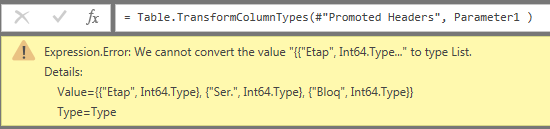
Let me know if there is any other way to replace a piece of code with something else instead of a parameter. Mainly because I have a variable number of columns in a query.
Thank you in advance for your help.
Solved! Go to Solution.
Hi @e17aguilar,
Based on my test, you could refer to below steps:
Create the parameter in the query editor and just enter the column name like the picture below:
Modify the code in the advanced language:
Now you could see the result.
Regards,
Daniel He
Hi Daniel,
Many thanks for your help. You helped me to unterstand that I should use a variable list instead of a parameter.
I continued my research with this idea on mind, and I found this post, by THE BICCOUNTANT:
They explain in a very short and simple way how to dynamically change the type from each column in a table, using a list that contains the name of all columns from the queried table.
Kind regards,
Ernesto J. Aguilar
Hi @e17aguilar,
Based on my test, you could refer to below steps:
Create the parameter in the query editor and just enter the column name like the picture below:
Modify the code in the advanced language:
Now you could see the result.
Regards,
Daniel He
Hi Daniel,
Many thanks for your help. You helped me to unterstand that I should use a variable list instead of a parameter.
I continued my research with this idea on mind, and I found this post, by THE BICCOUNTANT:
They explain in a very short and simple way how to dynamically change the type from each column in a table, using a list that contains the name of all columns from the queried table.
Kind regards,
Ernesto J. Aguilar
Hi @e17aguilar,
Thanks for your sharing, It's pleasant that your problem has been solved, could you please mark the helpful reply as Answered?
Regards,
Daniel He
The Power BI Data Visualization World Championships is back! Get ahead of the game and start preparing now!
| User | Count |
|---|---|
| 159 | |
| 132 | |
| 118 | |
| 79 | |
| 53 |