Get Fabric or SQL Certified for Free.
Get certified for free when you join Fabric Data Days 2026 and dive into Fabric, Power BI, SQL, AI, and other essential data skills.
Join now- Power BI forums
- Get Help with Power BI
- Desktop
- Service
- Report Server
- Power Query
- Mobile Apps
- Developer
- DAX Commands and Tips
- Custom Visuals Development Discussion
- Health and Life Sciences
- Power BI Spanish forums
- Translated Spanish Desktop
- Training and Consulting
- Instructor Led Training
- Dashboard in a Day for Women, by Women
- Galleries
- Data Stories Gallery
- Themes Gallery
- Contests Gallery
- QuickViz Gallery
- Quick Measures Gallery
- Visual Calculations Gallery
- Notebook Gallery
- Translytical Task Flow Gallery
- TMDL Gallery
- R Script Showcase
- Webinars and Video Gallery
- Ideas
- Custom Visuals Ideas (read-only)
- Issues
- Issues
- Events
- Upcoming Events
July 7 - July 17 | Round 2 of the Power BI Dataviz World Championships. Don't miss your chance! Learn more
- Power BI forums
- Forums
- Get Help with Power BI
- Desktop
- Re: Value null to type number error with postgres ...
- Subscribe to RSS Feed
- Mark Topic as New
- Mark Topic as Read
- Float this Topic for Current User
- Bookmark
- Subscribe
- Printer Friendly Page


- Mark as New
- Bookmark
- Subscribe
- Mute
- Subscribe to RSS Feed
- Permalink
- Report Inappropriate Content
Value null to type number error with postgres database
Hi,
I have been receiving "Cannot convert value Null to type number " error for a column of my postgres database connected to Power BI. I have tried using all the solutions available in the community by "Replacing errors with null" etc.. . The column contains numbers however an average of 'NaN' is showed when plotted on the visual board. Can't get rid of it. Please help!
Solved! Go to Solution.
- Mark as New
- Bookmark
- Subscribe
- Mute
- Subscribe to RSS Feed
- Permalink
- Report Inappropriate Content
Hi Vivek,
I was able to solve the issue temporarily . I had connected the tables using the SQL code in PowerBI previously and the joined results had many errors and issues. I eventually used the 'Model' tab in PowerBI dektop app and mapped the relationships between each table. Post linking all the tables, I sorted the values in descending order for the column "scheduleddurationmins" and removed the topn 'NaN' rows. I am now able to visualize the column and get a numeric value rather than 'NaN on my dashboard. However, I don't know if this is the best solution or a permanent one. Thanks for all the help btw.
Cheers! 🙂


- Mark as New
- Bookmark
- Subscribe
- Mute
- Subscribe to RSS Feed
- Permalink
- Report Inappropriate Content
What is the column property? Also, did you attempt to use query to bring the results to Power BI instead of the table?
Rgds,
Vivek
- Mark as New
- Bookmark
- Subscribe
- Mute
- Subscribe to RSS Feed
- Permalink
- Report Inappropriate Content
Hi Vivek,
The particular column I'm concerned about is having 'Decimal' values and I have tried bringing in the results using joins available in powerBI and tried another alternative where I joined them using the relationships tab. Howver, both of them don't solve my 'NaN'/Error value issue in that particular column.
Thanks
- Mark as New
- Bookmark
- Subscribe
- Mute
- Subscribe to RSS Feed
- Permalink
- Report Inappropriate Content
- Mark as New
- Bookmark
- Subscribe
- Mute
- Subscribe to RSS Feed
- Permalink
- Report Inappropriate Content
Hey Vivraan,
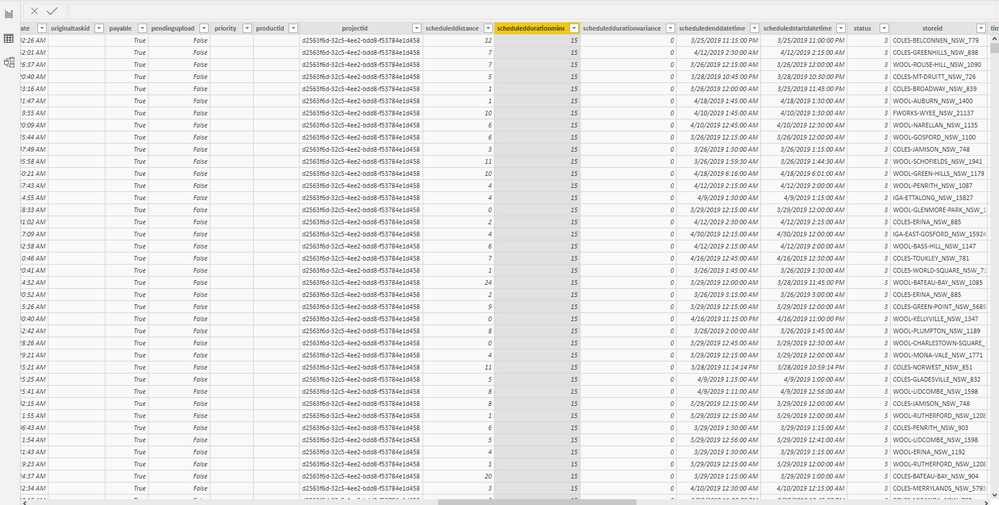
Apologies for the late reply. Please find the screenshots below. When I try plotting "scheduleddurationmins" , it shows as 'NAN'.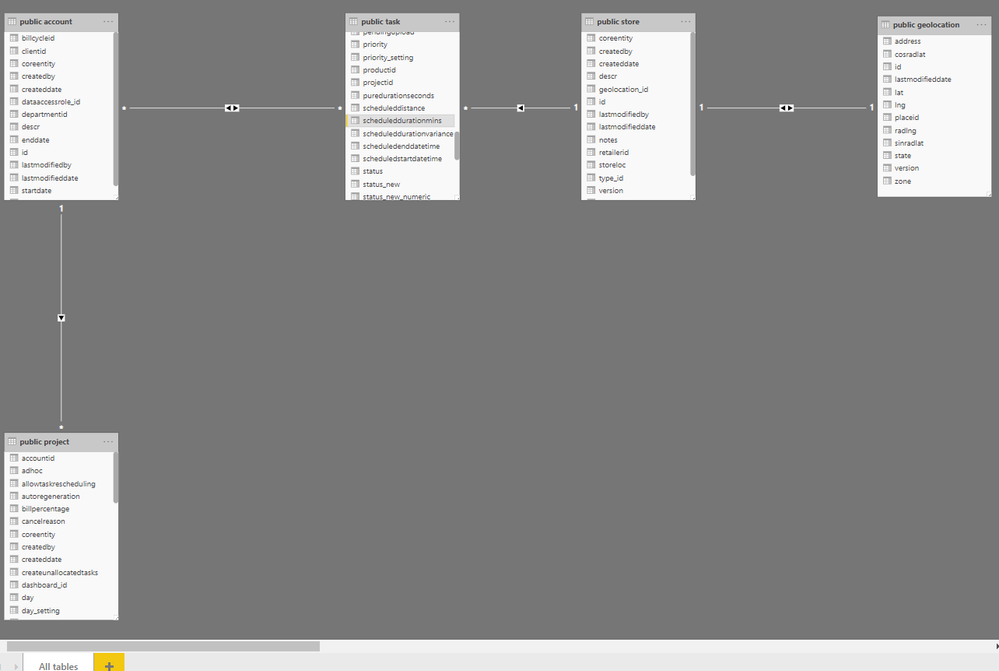
- Mark as New
- Bookmark
- Subscribe
- Mute
- Subscribe to RSS Feed
- Permalink
- Report Inappropriate Content
Thank you for sharing the screenshot, however it is not helping much.
I wanted to understand the column property in the PowerQuery window as the issue primarily lies there. Not able to figure out anything from Power BI data view.
Following might help:
# Copy the column value in an Excel file and share
# Screenshot of Power Query window with the column property in view of this column (screenshot of the error fields may also help)
# If there are any Error table created in the Power Query, then export of that (if possible)
Rgds,
Vivek
- Mark as New
- Bookmark
- Subscribe
- Mute
- Subscribe to RSS Feed
- Permalink
- Report Inappropriate Content
Hi Vivek,
I was able to solve the issue temporarily . I had connected the tables using the SQL code in PowerBI previously and the joined results had many errors and issues. I eventually used the 'Model' tab in PowerBI dektop app and mapped the relationships between each table. Post linking all the tables, I sorted the values in descending order for the column "scheduleddurationmins" and removed the topn 'NaN' rows. I am now able to visualize the column and get a numeric value rather than 'NaN on my dashboard. However, I don't know if this is the best solution or a permanent one. Thanks for all the help btw.
Cheers! 🙂

Helpful resources

FabCon & SQLCon – Barcelona 2026
Join us in Barcelona for FabCon and SQLCon, the Fabric, Power BI, SQL, and AI community event. Save €200 with code FABCMTY200.

Data Days 2026
Join Data Days 2026: 60 days of free live/on-demand sessions, challenges, study groups, and certification opportunities.

Power BI DataViz World Championships - June 2026
A new Power BI DataViz World Championship is coming this June! Don't miss out on submitting your entry.

| User | Count |
|---|---|
| 26 | |
| 24 | |
| 19 | |
| 19 | |
| 15 |


| User | Count |
|---|---|
| 46 | |
| 46 | |
| 43 | |
| 36 | |
| 33 |


