Join us in Barcelona for FabCon and SQLCon, September 28 - October 1, 2026.
This is best Fabric, Power BI, SQL and AI community event. How do we know? The last event sold out! Save €200 with code FABCMTY200.
Register now- Power BI forums
- Get Help with Power BI
- Desktop
- Service
- Report Server
- Power Query
- Mobile Apps
- Developer
- DAX Commands and Tips
- Custom Visuals Development Discussion
- Health and Life Sciences
- Power BI Spanish forums
- Translated Spanish Desktop
- Training and Consulting
- Instructor Led Training
- Dashboard in a Day for Women, by Women
- Galleries
- Data Stories Gallery
- Themes Gallery
- Contests Gallery
- QuickViz Gallery
- Quick Measures Gallery
- Visual Calculations Gallery
- Fabric Apps Gallery
- Notebook Gallery
- Translytical Task Flow Gallery
- TMDL Gallery
- R Script Showcase
- Webinars and Video Gallery
- Ideas
- Custom Visuals Ideas (read-only)
- Issues
- Issues
- Events
- Upcoming Events
The Fabric community is upgrading! Read all of the details including the timeline and what you can expect. Learn more
- Power BI forums
- Forums
- Get Help with Power BI
- Desktop
- Re: Value count problem
- Subscribe to RSS Feed
- Mark Topic as New
- Mark Topic as Read
- Float this Topic for Current User
- Bookmark
- Subscribe
- Printer Friendly Page

- Mark as New
- Bookmark
- Subscribe
- Mute
- Subscribe to RSS Feed
- Permalink
- Report Inappropriate Content
Value count problem
Hello good people, I am a new Power BI learner and have encountered a problem while designing a data model. I have attached the file where I am working on ContosoDW. You can see the values are the same. I need your experienced opinion. I will be very greatful if you are able to point out the exact problem in the table connection. Thank you. https://drive.google.com/file/d/1U-O8ctnBOkIb8E3-16IJ_uQQF8wAX3SB/view?usp=sharing

Solved! Go to Solution.


- Mark as New
- Bookmark
- Subscribe
- Mute
- Subscribe to RSS Feed
- Permalink
- Report Inappropriate Content
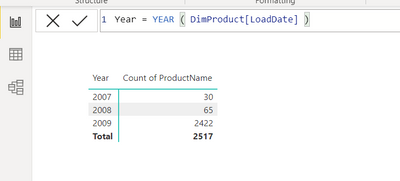
@Mahadi okay, all you need to do is add a new column in the DimProduct table like below and then use the YEAR from the DimProduct table instead of the Date table. Keep the Count of ProductName the same.
Hope this helps!
Theo 🙂
If I have posted a response that resolves your question, please accept it as a solution to formally close the post.
Also, if you are as passionate about Power BI, DAX and data as I am, please feel free to reach out if you have any questions, queries, or if you simply want to connect and talk to another data geek!
Want to connect?www.linkedin.com/in/theoconias
- Mark as New
- Bookmark
- Subscribe
- Mute
- Subscribe to RSS Feed
- Permalink
- Report Inappropriate Content
@Mahadi okay, all you need to do is add a new column in the DimProduct table like below and then use the YEAR from the DimProduct table instead of the Date table. Keep the Count of ProductName the same.
Hope this helps!
Theo 🙂
If I have posted a response that resolves your question, please accept it as a solution to formally close the post.
Also, if you are as passionate about Power BI, DAX and data as I am, please feel free to reach out if you have any questions, queries, or if you simply want to connect and talk to another data geek!
Want to connect?www.linkedin.com/in/theoconias


- Mark as New
- Bookmark
- Subscribe
- Mute
- Subscribe to RSS Feed
- Permalink
- Report Inappropriate Content
Hi,
What are you trying to accomplish by dragging Product Name to your visual? If you wan to know how many products are available for sale, then create a relationship from the AvailableForSaleDate column of the Products Table to the Date column of the DimDate Table - you will have to modify other relationships before you create this new relationship.
So please clarify what exactly do you want to accomplish.
Regards,
Ashish Mathur
http://www.ashishmathur.com
https://www.linkedin.com/in/excelenthusiasts/

- Mark as New
- Bookmark
- Subscribe
- Mute
- Subscribe to RSS Feed
- Permalink
- Report Inappropriate Content
I hope I'm not stepping on any toes but I thought I'd respond since Theo is answering from his phone.
The visual created has 2 fields from dimension tables (which is unusual) and if you look at the data model and the relationship directions, they are 1:many from the dimension tables to the FactSales table.
i.e. date table ->FactSales <- product table so the date table doesn't know anything about the product table unless something from the FactSales table is involved. A typical symptom of this sort of thing is when all the aggregation values for different dimension values are the same.
Dimension tables are used to slice and dice data from a fact table so in this instance you will need to decide what you actually want in the visual, for example, Calendar Year from the date table and count/distinct count of product ID from the FactSales table.
---
There's quite a lot to grasp here so I hope it makes sense.
Good luck in your powerbi journey.
- Mark as New
- Bookmark
- Subscribe
- Mute
- Subscribe to RSS Feed
- Permalink
- Report Inappropriate Content
- Mark as New
- Bookmark
- Subscribe
- Mute
- Subscribe to RSS Feed
- Permalink
- Report Inappropriate Content
Hi @Mahadi,
Certainly take a look at what @HotChilli has provided. It makes a lot of sense. I'd recommend following their approach to correcting the data model.
If you need more information on what @HotChilli has provided, make sure to comment and ask them. The Super Users and Community members are pretty amazing people!
All the best and look forward to you getting a solution for your current issue.
@HotChilli Thanks heaps for helping out!
Cheers guys!
Theo
If I have posted a response that resolves your question, please accept it as a solution to formally close the post.
Also, if you are as passionate about Power BI, DAX and data as I am, please feel free to reach out if you have any questions, queries, or if you simply want to connect and talk to another data geek!
Want to connect?www.linkedin.com/in/theoconias
- Mark as New
- Bookmark
- Subscribe
- Mute
- Subscribe to RSS Feed
- Permalink
- Report Inappropriate Content
Hi @Mahadi
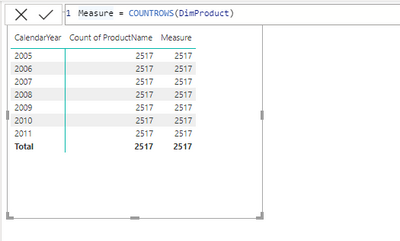
Can you use this measure and let me know if it works:
Measure = COUNTROWS ( Table )
Then drag it to the table visual? Apologies, on phone so can't download file.
hope this helps.
Theo
If I have posted a response that resolves your question, please accept it as a solution to formally close the post.
Also, if you are as passionate about Power BI, DAX and data as I am, please feel free to reach out if you have any questions, queries, or if you simply want to connect and talk to another data geek!
Want to connect?www.linkedin.com/in/theoconias
- Mark as New
- Bookmark
- Subscribe
- Mute
- Subscribe to RSS Feed
- Permalink
- Report Inappropriate Content
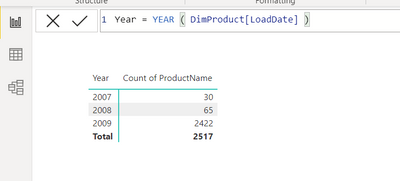
@Mahadi okay, all you need to do is add a new column in the DimProduct table like below and then use the YEAR from the DimProduct table instead of the Date table. Keep the Count of ProductName the same.
Hope this helps!
Theo 🙂
If I have posted a response that resolves your question, please accept it as a solution to formally close the post.
Also, if you are as passionate about Power BI, DAX and data as I am, please feel free to reach out if you have any questions, queries, or if you simply want to connect and talk to another data geek!
Want to connect?www.linkedin.com/in/theoconias

Helpful resources

FabCon & SQLCon – Barcelona 2026
Join us in Barcelona for FabCon and SQLCon, the Fabric, Power BI, SQL, and AI community event. Save €200 with code FABCMTY200.

Power BI DataViz World Championships - June 2026
A new Power BI DataViz World Championship is coming this June! Don't miss out on submitting your entry.

| User | Count |
|---|---|
| 24 | |
| 22 | |
| 20 | |
| 18 | |
| 14 |


| User | Count |
|---|---|
| 27 | |
| 21 | |
| 20 | |
| 20 | |
| 20 |


