This time we’re going bigger than ever. Fabric, Power BI, SQL, AI and more. We're covering it all. You won't want to miss it.
Learn moreDid you hear? There's a new SQL AI Developer certification (DP-800). Start preparing now and be one of the first to get certified. Register now
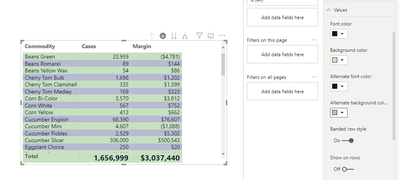
I've been trying to duplicate the format of a design I found on the web. I think there's an error with the Value formatting for the Matrix visual.
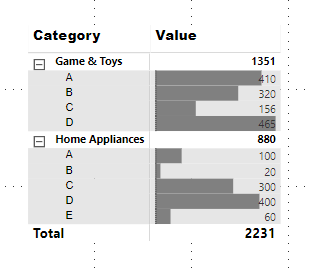
I'm trying to format the drilldown rows as one color, and the drill up as another. When I click on "Background Color" under Values, and change the color, it does what I expect. When I then click on the same color for the "Alternate Background Color" it changes all the color for the values, and removes color from the field names. The first image is an example, where the drill downs are a differnt color from the drill ups, which is what I would like to reproduce.
I'm including a few screen shots, because I have no other way to explain it.
Additionally, the Style is set to "none."
Solved! Go to Solution.
Hi @Anonymous ,
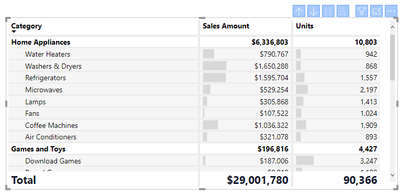
To do this you need to have the different parts of the table formatted individual:
You can change the Colour to whatever you want.
Check PBIX file attach.
Regards,
MFelix
Regards
Miguel Félix
Proud to be a Super User!
Check out my blog: Power BI em PortuguêsHi @Anonymous ,
To do this you need to have the different parts of the table formatted individual:
You can change the Colour to whatever you want.
Check PBIX file attach.
Regards,
MFelix
Regards
Miguel Félix
Proud to be a Super User!
Check out my blog: Power BI em PortuguêsCheck out the April 2026 Power BI update to learn about new features.
If you have recently started exploring Fabric, we'd love to hear how it's going. Your feedback can help with product improvements.
| User | Count |
|---|---|
| 37 | |
| 37 | |
| 31 | |
| 21 | |
| 16 |
| User | Count |
|---|---|
| 66 | |
| 56 | |
| 31 | |
| 26 | |
| 23 |