Get Fabric or SQL Certified for Free.
Get certified for free when you join Fabric Data Days 2026 and dive into Fabric, Power BI, SQL, AI, and other essential data skills.
Join now- Power BI forums
- Get Help with Power BI
- Desktop
- Service
- Report Server
- Power Query
- Mobile Apps
- Developer
- DAX Commands and Tips
- Custom Visuals Development Discussion
- Health and Life Sciences
- Power BI Spanish forums
- Translated Spanish Desktop
- Training and Consulting
- Instructor Led Training
- Dashboard in a Day for Women, by Women
- Galleries
- Data Stories Gallery
- Themes Gallery
- Contests Gallery
- QuickViz Gallery
- Quick Measures Gallery
- Visual Calculations Gallery
- Fabric Apps Gallery
- Notebook Gallery
- Translytical Task Flow Gallery
- TMDL Gallery
- R Script Showcase
- Webinars and Video Gallery
- Ideas
- Custom Visuals Ideas (read-only)
- Issues
- Issues
- Events
- Upcoming Events
July 28 - August 9 | Final Round of the Power BI Dataviz World Championships. This is your chance. Learn more
- Power BI forums
- Forums
- Get Help with Power BI
- Desktop
- Re: VAR formula error
- Subscribe to RSS Feed
- Mark Topic as New
- Mark Topic as Read
- Float this Topic for Current User
- Bookmark
- Subscribe
- Printer Friendly Page

- Mark as New
- Bookmark
- Subscribe
- Mute
- Subscribe to RSS Feed
- Permalink
- Report Inappropriate Content
VAR formula error
Hi Experts
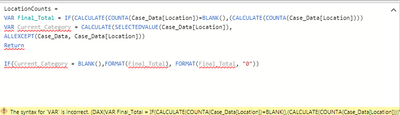
I am trying to write the following VAR formula but keep on getting an error, cannot see the wood for the trees.... HELP
LocationCount =
VAR Final_Total = IF(CALCULATE(COUNTA(Case_Data[Location])=BLANK(),(CALCULATE(COUNTA(Case_Data[Location])))
VAR Current_Category = CALCULATE(SELECTEDVALUE(Case_Data[Location]),
ALLEXCEPT(Case_Data, Case_Data[Location]))
Return
IF(Current_Category = BLANK(),FORMAT(Final_Total), FORMAT(Final_Total, "0"))
Solved! Go to Solution.


- Mark as New
- Bookmark
- Subscribe
- Mute
- Subscribe to RSS Feed
- Permalink
- Report Inappropriate Content
There is several errors in your formula - parenthesis in wrong places, and your first FORMAT is missing a second parameter. I have cleaned the parenthesis, but you still need to change your FORMAT to what ever you are trying to do.
LocationCounts =
VAR Final_Total =
IF(
	CALCULATE( COUNTA(Case_Data[Location]) ) = BLANK(),
	0,
	CALCULATE( COUNTA(Case_Data[Location]) )
)
VAR Current_Category =
CALCULATE(
	SELECTEDVALUE(Case_Data[Location]),
	ALLEXCEPT(Case_Data, Case_Data[Location])
)
RETURN

IF(
	Current_Category = BLANK(),
	FORMAT(Final_Total),
	FORMAT(Final_Total, "0")
)


- Mark as New
- Bookmark
- Subscribe
- Mute
- Subscribe to RSS Feed
- Permalink
- Report Inappropriate Content
hi,
I think you miss a closing parenthesis at the end of the first VAR
Barna
- Mark as New
- Bookmark
- Subscribe
- Mute
- Subscribe to RSS Feed
- Permalink
- Report Inappropriate Content
Hi Barna
I worked that out and now have....
still erroring
LocationCounts =
VAR Final_Total = IF(CALCULATE(COUNTA(Case_Data[Location])=BLANK(),0,(CALCULATE(COUNTA(Case_Data[Location]))))
VAR Current_Category = CALCULATE(SELECTEDVALUE(Case_Data[Location]),
ALLEXCEPT(Case_Data, Case_Data[Location]))
RETURN
IF(Current_Category = BLANK(),FORMAT(Final_Total), FORMAT(Final_Total, "0"))
- Mark as New
- Bookmark
- Subscribe
- Mute
- Subscribe to RSS Feed
- Permalink
- Report Inappropriate Content
Could you provide a small sample dataset with the columns and datatypes you are using with this calc? So that I can have a closer look on that.
- Mark as New
- Bookmark
- Subscribe
- Mute
- Subscribe to RSS Feed
- Permalink
- Report Inappropriate Content
There is several errors in your formula - parenthesis in wrong places, and your first FORMAT is missing a second parameter. I have cleaned the parenthesis, but you still need to change your FORMAT to what ever you are trying to do.
LocationCounts =
VAR Final_Total =
IF(
	CALCULATE( COUNTA(Case_Data[Location]) ) = BLANK(),
	0,
	CALCULATE( COUNTA(Case_Data[Location]) )
)
VAR Current_Category =
CALCULATE(
	SELECTEDVALUE(Case_Data[Location]),
	ALLEXCEPT(Case_Data, Case_Data[Location])
)
RETURN

IF(
	Current_Category = BLANK(),
	FORMAT(Final_Total),
	FORMAT(Final_Total, "0")
)
- Mark as New
- Bookmark
- Subscribe
- Mute
- Subscribe to RSS Feed
- Permalink
- Report Inappropriate Content
You should try to use daxformatter when writing your DAX - formatting your DAX correctly will help you spot errors and also make your DAX much easier to read/understand when you have to look at it months later.
- Mark as New
- Bookmark
- Subscribe
- Mute
- Subscribe to RSS Feed
- Permalink
- Report Inappropriate Content
- Mark as New
- Bookmark
- Subscribe
- Mute
- Subscribe to RSS Feed
- Permalink
- Report Inappropriate Content
@Barnee - the tip was ment for @Anonymous. You seem to understand the DAX 🙂
- Mark as New
- Bookmark
- Subscribe
- Mute
- Subscribe to RSS Feed
- Permalink
- Report Inappropriate Content
All (experts)
many thanks for the excellent feedback and support....
- Mark as New
- Bookmark
- Subscribe
- Mute
- Subscribe to RSS Feed
- Permalink
- Report Inappropriate Content
Hi Barnee
thats i s going to be tricky cannot upload from ,my location... appricated your assistance so far....sorry
- Mark as New
- Bookmark
- Subscribe
- Mute
- Subscribe to RSS Feed
- Permalink
- Report Inappropriate Content
so, without knowing what is your goal with this calculation I figured out some syntax mistakes.
LocationCounts =
VAR Final_Total = IF(CALCULATE(COUNTA(Case_Data[Location]))=BLANK(),0,(CALCULATE(COUNTA(Case_Data[Location]))))
VAR Current_Category = CALCULATE(SELECTEDVALUE(Case_Data[Location]),
ALLEXCEPT(Case_Data, Case_Data[Location]))
RETURN

IF(Current_Category = BLANK(),Final_Total, FORMAT(Final_Total, "0"))
1. ) at the firts VAR you use a calculate function but as far as I see it has no second argument so you may want to close that CALCULATE before the =BLANK() part.
2) after the RETURN at the second argument of the IF function, you used a FORMAT function like this: FORMAT(Final_Total).
I'm not sure exactly what was your goal with it but the FORMAT function has to have two arguments like you used at the end of the calculation FORMAT(Final_Total, "0") . So that as i deleted the FORMAT function from the second argument and used the Final_Total only it worked for me.
Without context it was a bit hard to know what yo wanted but the code runs.
Helpful resources

Fabric Community Sticker Challenge - Barcelona 2026
If you love stickers, then you will definitely want to check out our community sticker challenge, Barcelona edition!

Power BI Monthly Update - July 2026
Check out the July 2026 Power BI update to learn about new features.

Power BI DataViz World Championships - June 2026
A new Power BI DataViz World Championship is coming this June! Don't miss out on submitting your entry.

| User | Count |
|---|---|
| 29 | |
| 28 | |
| 20 | |
| 20 | |
| 19 |


| User | Count |
|---|---|
| 35 | |
| 26 | |
| 20 | |
| 18 | |
| 17 |


