Join us at FabCon Atlanta from March 16 - 20, 2026, for the ultimate Fabric, Power BI, AI and SQL community-led event. Save $200 with code FABCOMM.
Register now!The Power BI Data Visualization World Championships is back! Get ahead of the game and start preparing now! Learn more
Hi Community,
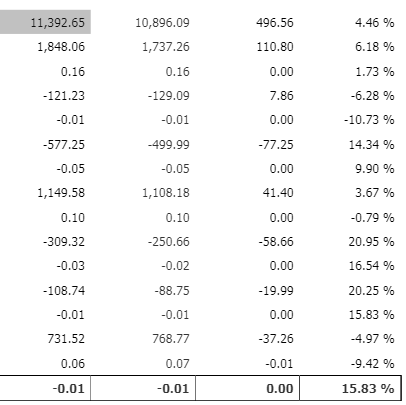
I'm trying to create measures using variables in Power BI, but in the final result I'm not able to save the result as a numerical value which is not allowing me to aggregate the values. I used format and values both the options.
Please help how to fix this.
Solved! Go to Solution.
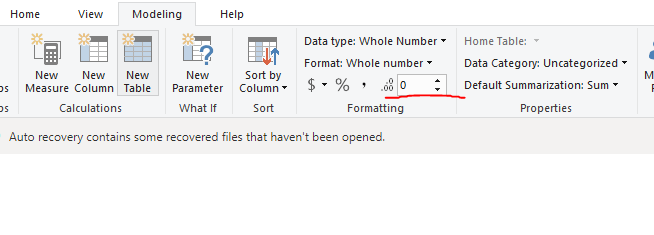
Remove the call to FORMAT() as that is what is converting the result to a string. Instead set the formatting of the measure using the Formatting section of the Modeling tab in the ribbon
RETURN
SWITCH(TRUE(),
MAX('P&L MAPPING'[ACC DESCRIPTION])="TOTALVOLLY",FORMAT(TOTALVOL_LY,"###0.##0"),
MAX('P&L MAPPING'[ACC DESCRIPTION])="TOTALGTOLY",FORMAT(TOTALGTO_LY/1000,"###0.##0")
RETURN
SWITCH(TRUE(),
MAX('P&L MAPPING'[ACC DESCRIPTION])="TOTALVOLLY",VALUE(FORMAT(TOTALVOL_LY,"###0.##0")),
MAX('P&L MAPPING'[ACC DESCRIPTION])="TOTALGTOLY",VALUE(FORMAT(TOTALGTO_LY/1000,"###0.##0"))
Hi @Anonymous ,
Please format the value here.
If it doesn't meet your requirement, kindly share your sample data and excepted result to me if you don't have any Confidential Information. Please upload your files to One Drive and share the link here.
Remove the call to FORMAT() as that is what is converting the result to a string. Instead set the formatting of the measure using the Formatting section of the Modeling tab in the ribbon
@Anonymous,
Please provide more details so everyone can help you better.
The Power BI Data Visualization World Championships is back! Get ahead of the game and start preparing now!
| User | Count |
|---|---|
| 39 | |
| 35 | |
| 33 | |
| 32 | |
| 29 |
| User | Count |
|---|---|
| 134 | |
| 96 | |
| 78 | |
| 67 | |
| 65 |