Share feedback directly with Fabric product managers, participate in targeted research studies and influence the Fabric roadmap.
Sign up nowGet Fabric certified for FREE! Don't miss your chance! Learn more
Hi experts,
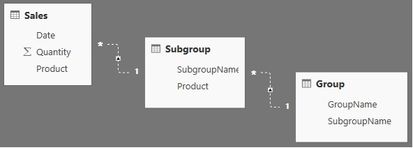
I am trying to sum Quantity by GroupName in the following relationship scenario. Tables are related via the same name fields.
This is simplified part of a much more complicated relationship scheme in which I can not have active relationships between these three tables. However, I read that one can use nested USERELATIONSHIP instructions. How do I do that?
Thank you.
Solved! Go to Solution.
Hi @gvg
From the tables/relationships you've shown, you should just activate the two relationships simultaneously.
The measure should look something like:
=
CALCULATE (
SUM ( Sales[Quantity] ),
USERELATIONSHIP ( Sales[Product], Subgroup[Product] ),
USERELATIONSHIP ( Subgroup[SubgroupName], Group[SubgroupName] )
)
You can also use the CROSSFILTER function with the same effect:
=
CALCULATE (
SUM ( Sales[Quantity] ),
CROSSFILTER ( Sales[Product], Subgroup[Product], OneWay ),
CROSSFILTER ( Subgroup[SubgroupName], Group[SubgroupName], OneWay )
)Owen 🙂
Hi @gvg
From the tables/relationships you've shown, you should just activate the two relationships simultaneously.
The measure should look something like:
=
CALCULATE (
SUM ( Sales[Quantity] ),
USERELATIONSHIP ( Sales[Product], Subgroup[Product] ),
USERELATIONSHIP ( Subgroup[SubgroupName], Group[SubgroupName] )
)
You can also use the CROSSFILTER function with the same effect:
=
CALCULATE (
SUM ( Sales[Quantity] ),
CROSSFILTER ( Sales[Product], Subgroup[Product], OneWay ),
CROSSFILTER ( Subgroup[SubgroupName], Group[SubgroupName], OneWay )
)Owen 🙂
Thanks! It works. Except that Groups table name should be in quotes ('Groups') as it probably represents DAX keyword.
Share feedback directly with Fabric product managers, participate in targeted research studies and influence the Fabric roadmap.
| User | Count |
|---|---|
| 62 | |
| 62 | |
| 42 | |
| 21 | |
| 18 |
| User | Count |
|---|---|
| 120 | |
| 113 | |
| 38 | |
| 29 | |
| 28 |