cancel
Showing results for 
Search instead for 
Did you mean: 

The Power BI Data Visualization World Championships is back! Get ahead of the game and start preparing now! Learn more

Reply
gvg
Post Prodigy
Post Prodigy

Using two or more USERELATIONSHIPs

Hi experts,


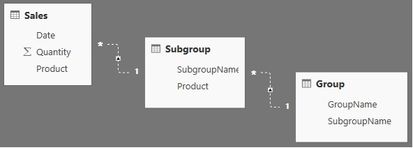
I am trying to sum Quantity by GroupName in the following relationship scenario. Tables are related via the same name fields.


Sales.jpg


This is simplified part of a much more complicated relationship scheme in which I can not have active relationships between these three tables. However, I read that one can use nested USERELATIONSHIP instructions. How do I do that?


Thank you.


1 ACCEPTED SOLUTION
OwenAuger
Super User
Super User

Hi @gvg


From the tables/relationships you've shown, you should just activate the two relationships simultaneously.


The measure should look something like:


=
CALCULATE (
    SUM ( Sales[Quantity] ),
    USERELATIONSHIP ( Sales[Product], Subgroup[Product] ),
    USERELATIONSHIP ( Subgroup[SubgroupName], Group[SubgroupName] )
)


You can also use the CROSSFILTER function with the same effect:


=
CALCULATE (
    SUM ( Sales[Quantity] ),
    CROSSFILTER ( Sales[Product], Subgroup[Product], OneWay ),
    CROSSFILTER ( Subgroup[SubgroupName], Group[SubgroupName], OneWay )
)

Owen 🙂


Owen Auger
Did I answer your question? Mark my post as a solution!
Blog
LinkedIn

View solution in original post

2 REPLIES 2
OwenAuger
Super User
Super User

Hi @gvg


From the tables/relationships you've shown, you should just activate the two relationships simultaneously.


The measure should look something like:


=
CALCULATE (
    SUM ( Sales[Quantity] ),
    USERELATIONSHIP ( Sales[Product], Subgroup[Product] ),
    USERELATIONSHIP ( Subgroup[SubgroupName], Group[SubgroupName] )
)


You can also use the CROSSFILTER function with the same effect:


=
CALCULATE (
    SUM ( Sales[Quantity] ),
    CROSSFILTER ( Sales[Product], Subgroup[Product], OneWay ),
    CROSSFILTER ( Subgroup[SubgroupName], Group[SubgroupName], OneWay )
)

Owen 🙂


Owen Auger
Did I answer your question? Mark my post as a solution!
Blog
LinkedIn

Thanks! It works. Except that Groups table name should be in quotes ('Groups') as it probably represents DAX keyword.

Helpful resources

Announcements
Power BI DataViz World Championships

Power BI Dataviz World Championships

The Power BI Data Visualization World Championships is back! Get ahead of the game and start preparing now!

December 2025 Power BI Update Carousel

Power BI Monthly Update - December 2025

Check out the December 2025 Power BI Holiday Recap!

FabCon Atlanta 2026 carousel

FabCon Atlanta 2026

Join us at FabCon Atlanta, March 16-20, for the ultimate Fabric, Power BI, AI and SQL community-led event. Save $200 with code FABCOMM.

Top Solution Authors