cancel
Showing results for 
Search instead for 
Did you mean: 

We've captured the moments from FabCon & SQLCon that everyone is talking about, and we are bringing them to the community, live and on-demand. Starts on April 14th. Register now

Reply
GenericUser1
Helper I
Helper I

Using the GENERATESERIES function between two columns

Hey Guys,


So I know that in a calculated column you can use a function called generate series, so if you put in values 1, 5. This will count the values in increments by 1(by default). so the values in the calculated column would look like 1, 2, 3, 4, 5.  


I was thinking if it's possible to do that between two time data type columns. Or if there's another way to do this can anyone help? 


I want a calculated column that counts the time between 9am to 5pm in hour increments. 


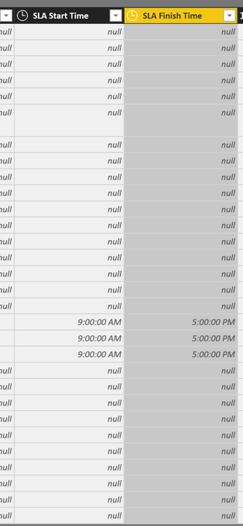
So I was thinking something like generateseries (incidents[SLA Start Time], incidents[SLA finish time])


2018-09-19 14_43_17-BizData Managed Services Updated 19.09 - Power Query Editor.pngnot all hours are going to be same value, this will change, which is why I was thinking if there's a way to use the columns instead of a single value like (9, 5)


3 REPLIES 3
v-danhe-msft
Microsoft Employee
Microsoft Employee

Hi @GenericUser1,

Could you please tell me if your problem has been solved? If it is, could you please mark the helpful replies as Answered?


Regards,

Daniel He

Community Support Team _ Daniel He
If this post helps, then please consider Accept it as the solution to help the other members find it more quickly.
v-danhe-msft
Microsoft Employee
Microsoft Employee

Hi @GenericUser1,

Based on my test, you could refer to below bolg:

Quick DAX: Use GENERATESERIES to create Time buckets


Hope it could help you.


Regards,

Daniel He


Community Support Team _ Daniel He
If this post helps, then please consider Accept it as the solution to help the other members find it more quickly.

Not exactly sorry, with the blog it looks like the values have to be put in manually. I was hoping if there was some way of creating a generateseries between two columns that would do that automatically, but the way I'm thinking about this could be wrong.


what i was hoping as a result would be, for example, if this was the table:


type of hours start           type of hours end        generateseries column


9am                                   5pm                           9, 10, 11, 12, 1, 2, 3, 4, 5

7pm                                   7pm                          7, 8, 9, 10, 11, 12, 13, 14, 15, 16, 17, 18, 19


There a lot of hours that are flexible depending on the helpdesk service provided and what hours count in a contract signed by a customer. Sometimes this will need to be updated and I don't think I have time to keep doing this manually, do you get what I mean?


thanks,


Helpful resources

Announcements
New to Fabric survey Carousel

New to Fabric Survey

If you have recently started exploring Fabric, we'd love to hear how it's going. Your feedback can help with product improvements.

Power BI DataViz World Championships carousel

Power BI DataViz World Championships - June 2026

A new Power BI DataViz World Championship is coming this June! Don't miss out on submitting your entry.

Join our Fabric User Panel

Join our Fabric User Panel

Share feedback directly with Fabric product managers, participate in targeted research studies and influence the Fabric roadmap.