
Get certified for free when you join Fabric Data Days 2026 and dive into Fabric, Power BI, SQL, AI, and other essential data skills.
Join nowJuly 7 - July 17 | Round 2 of the Power BI Dataviz World Championships. Don't miss your chance! Learn more
Hi, I am using back button in my development, when i click the back button, the applied filters must be cleared out and also it must go to previous page.
Can we achieve this, please suggest any solution.
Solved! Go to Solution.
Hi, @Jai_Bankar
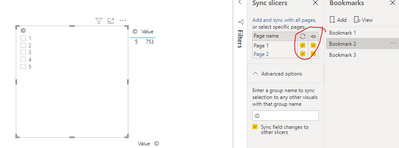
After some tests in the Power BI desktop, I think this function can be achieved using bookmark and Sync slicers. You can follow my steps:
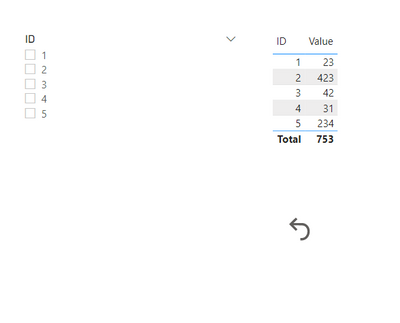
Then I click the button, I jumped up to the page2, then I go back to page1, I found the Slicer is cleared.
And you can get what you want.
You can download my test pbix file here
More info about Sync and use slicers on other pages
If this result is not what you want, you can post some sample data(without sensitive data) and your expected result.
How to Get Your Question Answered Quickly
Best Regards,
Community Support Team _Robert Qin
If this post helps, then please consider Accept it as the solution to help the other members find it more quickly.
its not working in filter pane also
Hi, @Jai_Bankar
After some tests in the Power BI desktop, I think this function can be achieved using bookmark and Sync slicers. You can follow my steps:
Then I click the button, I jumped up to the page2, then I go back to page1, I found the Slicer is cleared.
And you can get what you want.
You can download my test pbix file here
More info about Sync and use slicers on other pages
If this result is not what you want, you can post some sample data(without sensitive data) and your expected result.
How to Get Your Question Answered Quickly
Best Regards,
Community Support Team _Robert Qin
If this post helps, then please consider Accept it as the solution to help the other members find it more quickly.
Hi, @Jai_Bankar
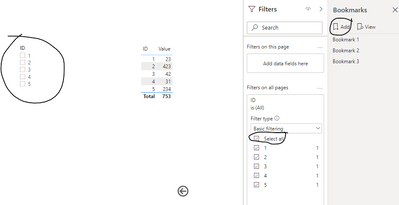
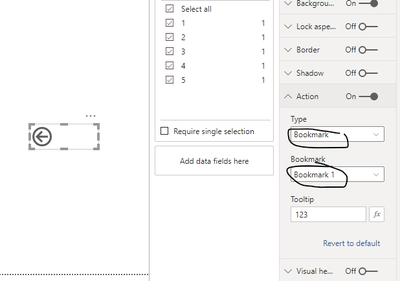
What do you mean by โthe applied filters must be cleared outโ? If you want to clear the Slicer and the filters of the page you are going back to, you can create a bookmark for the backed page without any Slicer and filter. Then set the action for the Button, like this:
If you want to clear the filter in the original page when you click the back buttom, I donโt think it can be achieved. Because each buttom can only have one action. You can only create another buttom to reset the filer then click โBackโ buttom to the backed page.
Resetting page back to defaults using the new buttons feature and bookmarks in power bi
If this result is not what you want, you can post some sample data(without sensitive data) and your expected result.
How to Get Your Question Answered Quickly
Best Regards,
Community Support Team _Robert Qin
If this post helps, then please consider Accept it as the solution to help the other members find it more quickly.
Thank you!
My question was , I want to clear the filter in the original page when I click back button. But it's not possible to assign two actions for single button, can we have any other workaround for this issue?
@Jai_Bankar , this seems like going to clear the slicer using bookmarks. I think create a clear a slicer bookmark on page 1 and use that on page 2 button
https://radacad.com/clear-all-slicers-in-power-bi-a-bookmark-story
Thank you!
Already tried this, works well , but my concern was, if i click back button, the filters applied in the current page should get cleared and then it should return to back page.
Join us in Barcelona for FabCon and SQLCon, the Fabric, Power BI, SQL, and AI community event. Save โฌ200 with code FABCMTY200.
Join Fabric Data Days 2026: 60 days of free live/on-demand sessions, challenges, study groups, and certification opportunities.
| User | Count |
|---|---|
| 23 | |
| 22 | |
| 18 | |
| 17 | |
| 13 |
| User | Count |
|---|---|
| 63 | |
| 44 | |
| 42 | |
| 40 | |
| 39 |