Don't miss your chance to take the Fabric Data Engineer (DP-600) exam for FREE! Find out how by watching the DP-600 session on-demand now through April 28th.
Learn moreJoin the FabCon + SQLCon recap series. Up next: Power BI, Real-Time Intelligence, IQ and AI, and Data Factory take center stage. All sessions are available on-demand after the live show. Register now
I am trying to use one dashboard for different entities's data. the entities data are extracted via the similar report and fields are similar. How do I replicate the dashboard across the different entities? Is there a quick way for it to be replicated?
I am currently redoing them manually (e.g., importing excel and reselecting fields for visualisation.)
Solved! Go to Solution.
@Anonymous , Not very clear, what is needed.
You can change the source, using the edit data source setting.
You can use RLS if data is together and if you want to filter by users
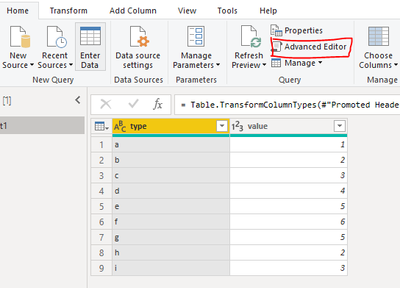
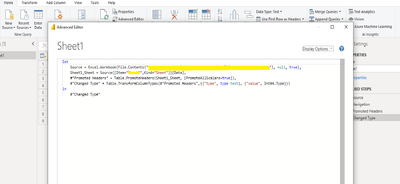
Are the field names the same? If so, what I've done to make this easier and it seemed to work:
You can change the data source path or excel sheet in the query editor.
Are the field names the same? If so, what I've done to make this easier and it seemed to work:
You can change the data source path or excel sheet in the query editor.
Thanks for the illustration!
Is it an option to combine all your data (append) and then just use a slicer to choose which data are viewed?
Pat
To learn more about Power BI, follow me on Twitter or subscribe on YouTube.
@Anonymous , Not very clear, what is needed.
You can change the source, using the edit data source setting.
You can use RLS if data is together and if you want to filter by users
Check out the April 2026 Power BI update to learn about new features.
If you have recently started exploring Fabric, we'd love to hear how it's going. Your feedback can help with product improvements.
A new Power BI DataViz World Championship is coming this June! Don't miss out on submitting your entry.
| User | Count |
|---|---|
| 40 | |
| 37 | |
| 32 | |
| 20 | |
| 15 |
| User | Count |
|---|---|
| 66 | |
| 58 | |
| 31 | |
| 25 | |
| 24 |