Don't miss your chance to take the Fabric Data Engineer (DP-700) exam on us!
Learn moreNext up in the FabCon + SQLCon recap series: The roadmap for Microsoft SQL and Maximizing Developer experiences in Fabric. All sessions are available on-demand after the live show. Register now
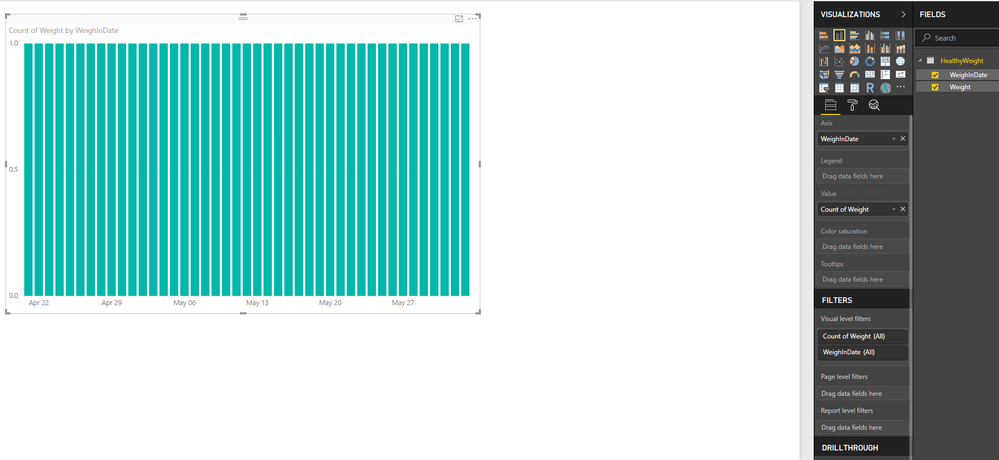
I know this answer is staring at me in the face. Why when I have an unsummarized value I want to show on either a line chart or bar chart does it summarize? The axis is a day and then I have one value - a weight. Here are some visuals and thanks for the information
Solved! Go to Solution.
Hey,
please check if your column "WeighInDate" is of data type "datetime" or "date" basically I would recommend to change it to date.
Mark the visual, switch to the Format options and check the settings for "X-Axis". I guess the value for the type equals to "continuous" switch it to "categorical" and you will get what you want.
Hopefully this is what you are looking for
Regards
Tom
Hey,
please check if your column "WeighInDate" is of data type "datetime" or "date" basically I would recommend to change it to date.
Mark the visual, switch to the Format options and check the settings for "X-Axis". I guess the value for the type equals to "continuous" switch it to "categorical" and you will get what you want.
Hopefully this is what you are looking for
Regards
Tom
That did it. Thanks
If you have recently started exploring Fabric, we'd love to hear how it's going. Your feedback can help with product improvements.
A new Power BI DataViz World Championship is coming this June! Don't miss out on submitting your entry.
Share feedback directly with Fabric product managers, participate in targeted research studies and influence the Fabric roadmap.
| User | Count |
|---|---|
| 48 | |
| 45 | |
| 41 | |
| 19 | |
| 17 |
| User | Count |
|---|---|
| 68 | |
| 67 | |
| 33 | |
| 31 | |
| 29 |