This is best Fabric, Power BI, SQL and AI community event. How do we know? The last event sold out! Save €200 with code FABCMTY200.
Register nowA new Data Days event is coming soon! This time we’re going bigger than ever. Fabric, Power BI, SQL, AI and more. Don't miss out.
Hi,
I'm trying to get icons displayed for Revision date column and using this measure which works fine:
Solved! Go to Solution.
Hey @Anonymous ,
I guess the revision date in the same table as the calculated column. Then try the following formula:
CF1 =
VAR number_of_days = 'MDR'[Revision date] - TODAY()
RETURN
SWITCH(
TRUE(),
number_of_days < 0, "Red",
number_of_days < 180, "Orange",
"Green"
)
Be aware that a calculated column is always static, so the value will be evaluated when the data model is loaded. After that the values stay as they are. They won't change when you change a slicer or something like that.
@Anonymous
You can do it with one measure, modify your measure as follows:
CF1 =
VAR number_of_days =
SELECTEDVALUE ( Table5[Date]) - TODAY ()
RETURN
SWITCH (
TRUE (),
number_of_days < 0, 1,
number_of_days < 180, 2,
3
)
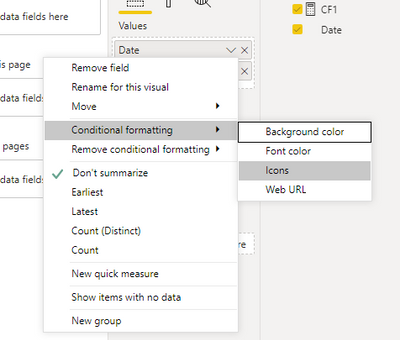
Select the Date and Icon for CF:
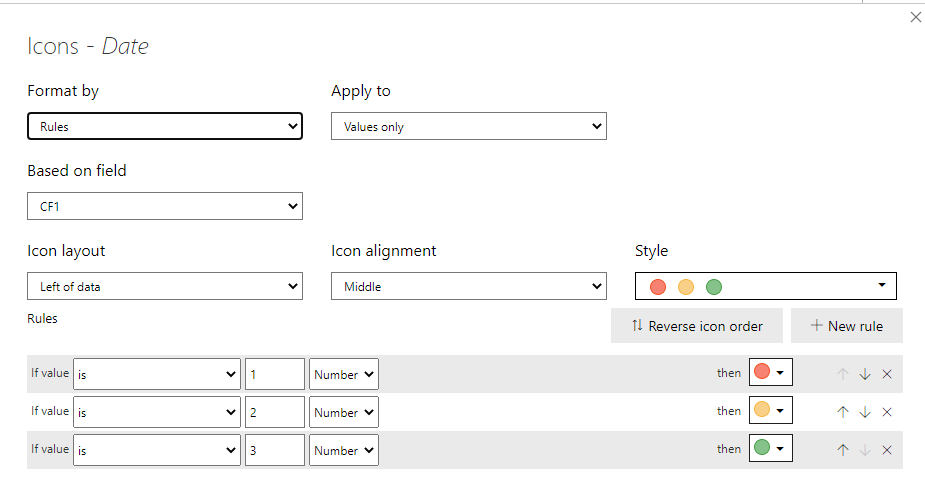
Configure CF as follows:
⭕ Subscribe and learn Power BI from these videos
⚪ Website ⚪ LinkedIn ⚪ PBI User Group
Hey @Anonymous ,
I guess the revision date in the same table as the calculated column. Then try the following formula:
CF1 =
VAR number_of_days = 'MDR'[Revision date] - TODAY()
RETURN
SWITCH(
TRUE(),
number_of_days < 0, "Red",
number_of_days < 180, "Orange",
"Green"
)
Be aware that a calculated column is always static, so the value will be evaluated when the data model is loaded. After that the values stay as they are. They won't change when you change a slicer or something like that.
Check out the May 2026 Power BI update to learn about new features.
Sign up to receive a private message when registration opens and key events begin.
If you have recently started exploring Fabric, we'd love to hear how it's going. Your feedback can help with product improvements.
| User | Count |
|---|---|
| 31 | |
| 26 | |
| 23 | |
| 22 | |
| 15 |
| User | Count |
|---|---|
| 62 | |
| 47 | |
| 28 | |
| 24 | |
| 21 |