Join us at FabCon Atlanta from March 16 - 20, 2026, for the ultimate Fabric, Power BI, AI and SQL community-led event. Save $200 with code FABCOMM.
Register now!The Power BI Data Visualization World Championships is back! Get ahead of the game and start preparing now! Learn more
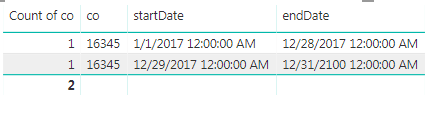
I have this table:
I currently cannot establish a relationship to this table because of duplication. How can I transform this into one record using the earliest start date (1/1/2017) and the latest enddate (12/31/2100)?
Solved! Go to Solution.
Hi @Anonymous,
Please download the solutions from the attachment. You can achieve it either by Power Query or by DAX.
1. Using Power Query "Group by" function.
2. DAX.
Table = SUMMARIZE ( 'Table2', Table2[Co], "startDate", MIN ( 'Table2'[startDate] ), "endDate", MAX ( 'Table2'[endDate] ) )
Best Regards,
Dale
Hi @Anonymous,
Please download the solutions from the attachment. You can achieve it either by Power Query or by DAX.
1. Using Power Query "Group by" function.
2. DAX.
Table = SUMMARIZE ( 'Table2', Table2[Co], "startDate", MIN ( 'Table2'[startDate] ), "endDate", MAX ( 'Table2'[endDate] ) )
Best Regards,
Dale
The Power BI Data Visualization World Championships is back! Get ahead of the game and start preparing now!
| User | Count |
|---|---|
| 40 | |
| 37 | |
| 35 | |
| 34 | |
| 27 |
| User | Count |
|---|---|
| 136 | |
| 99 | |
| 73 | |
| 66 | |
| 65 |