Join us at FabCon Atlanta from March 16 - 20, 2026, for the ultimate Fabric, Power BI, AI and SQL community-led event. Save $200 with code FABCOMM.
Register now!The Power BI Data Visualization World Championships is back! It's time to submit your entry. Live now!
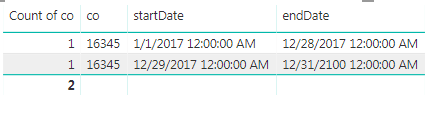
I have this table:
I currently cannot establish a relationship to this table because of duplication. How can I transform this into one record using the earliest start date (1/1/2017) and the latest enddate (12/31/2100)?
Solved! Go to Solution.
Hi @Anonymous,
Please download the solutions from the attachment. You can achieve it either by Power Query or by DAX.
1. Using Power Query "Group by" function.
2. DAX.
Table = SUMMARIZE ( 'Table2', Table2[Co], "startDate", MIN ( 'Table2'[startDate] ), "endDate", MAX ( 'Table2'[endDate] ) )
Best Regards,
Dale
Hi @Anonymous,
Please download the solutions from the attachment. You can achieve it either by Power Query or by DAX.
1. Using Power Query "Group by" function.
2. DAX.
Table = SUMMARIZE ( 'Table2', Table2[Co], "startDate", MIN ( 'Table2'[startDate] ), "endDate", MAX ( 'Table2'[endDate] ) )
Best Regards,
Dale
The Power BI Data Visualization World Championships is back! It's time to submit your entry.
Check out the January 2026 Power BI update to learn about new features.
| User | Count |
|---|---|
| 56 | |
| 42 | |
| 41 | |
| 21 | |
| 21 |
| User | Count |
|---|---|
| 150 | |
| 106 | |
| 65 | |
| 36 | |
| 36 |