Join us at FabCon Atlanta from March 16 - 20, 2026, for the ultimate Fabric, Power BI, AI and SQL community-led event. Save $200 with code FABCOMM.
Register now!Vote for your favorite vizzies from the Power BI Dataviz World Championship submissions. Vote now!
Hi,
I'm new to Power BI, but I'm excited about what I see so far. Right now, I'm looking for guidance on how to use some of the custom visuals. Specifically the bullet and guage visuals. Can anyone point me in the right direction?
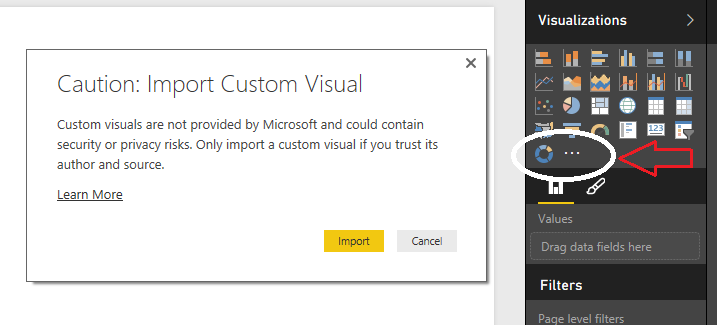
@bernardjesmith You can download all the available custom visual here. Then you can import the custom visual pbviz file directly into Power BI Desktop tool as shown in image below. You can find video tutorials on YouTube on how to use those visuals.
If you love stickers, then you will definitely want to check out our Community Sticker Challenge!
Check out the January 2026 Power BI update to learn about new features.
| User | Count |
|---|---|
| 70 | |
| 52 | |
| 38 | |
| 29 | |
| 22 |
| User | Count |
|---|---|
| 135 | |
| 122 | |
| 55 | |
| 37 | |
| 32 |