cancel
Showing results for 
Search instead for 
Did you mean: 

Data Days is here! Join us now for 60+ days of learning, challenges, and connection. Learn more

Reply
bernardjesmith
Advocate I
Advocate I

Using custom Visuals

Hi,


I'm new to Power BI, but I'm excited about what I see so far. Right now, I'm looking for guidance on how to use some of the custom visuals. Specifically the bullet and guage visuals. Can anyone point me in the right direction?

1 REPLY 1
ashishrj
Power Participant
Power Participant

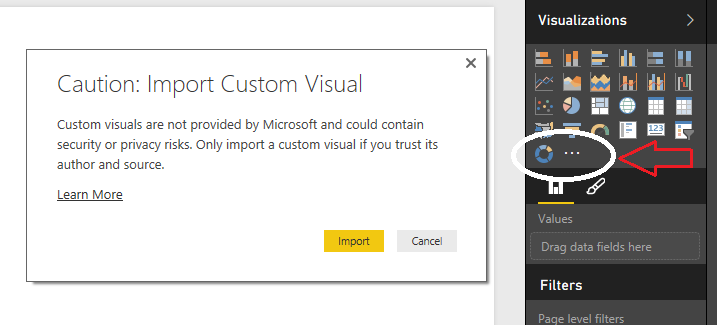
@bernardjesmith You can download all the available custom visual here. Then you can import the custom visual pbviz file directly into Power BI Desktop tool as shown in image below. You can find video tutorials on YouTube on how to use those visuals.


ImportVisual.png

Helpful resources

Announcements
Fabric Data Days is here Carousel

Fabric Data Days 2026

Don't miss out on Data Days, June 15 through August 7. Learn Fabric, Power BI, SQL, AI and more.

May Power BI Update Carousel

Power BI Monthly Update - May 2026

Check out the May 2026 Power BI update to learn about new features.

Power BI DataViz World Championships carousel

Power BI DataViz World Championships - June 2026

A new Power BI DataViz World Championship is coming this June! Don't miss out on submitting your entry.