
Learn from the best! Meet the four finalists headed to the FINALS of the Power BI Dataviz World Championships! Register now
Let's see if I can explain this the right way...Please comment for clarification
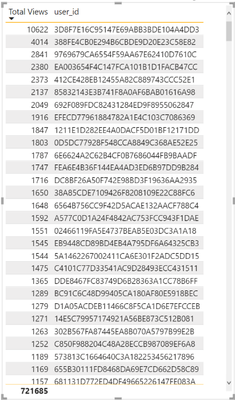
I have a calculated measure (total views) that I am using in a table, and when paired with the user ID field, it gives the total number of views per user. I want to be able to count how many are >10. A seperate table cannot be created because I will need to filter by date and location as well. Is there any way to do this? I have the correct table (shown as a visualization) shown below, and the formula (not working) I was trying to use below
Solved! Go to Solution.
You can create a measure like
Views > 10 =
var summaryTable = ADDCOLUMNS( VALUES('Table'[User ID]), "@num views", [Total Views])
return COUNTROWS( FILTER( summaryTable, [@num views] > 10) )
You can create a measure like
Views > 10 =
var summaryTable = ADDCOLUMNS( VALUES('Table'[User ID]), "@num views", [Total Views])
return COUNTROWS( FILTER( summaryTable, [@num views] > 10) )
Looks like this did the trick. Thanks so much becuase I was really struggling with this one
A new Power BI DataViz World Championship is coming this June! Don't miss out on submitting your entry.
Share feedback directly with Fabric product managers, participate in targeted research studies and influence the Fabric roadmap.
| User | Count |
|---|---|
| 46 | |
| 31 | |
| 29 | |
| 15 | |
| 15 |
| User | Count |
|---|---|
| 58 | |
| 56 | |
| 38 | |
| 21 | |
| 21 |