
Learn from the best! Meet the four finalists headed to the FINALS of the Power BI Dataviz World Championships! Register now
Let's see if I can explain this the right way...Please comment for clarification
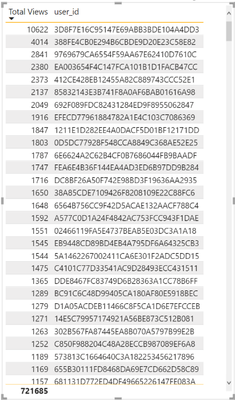
I have a calculated measure (total views) that I am using in a table, and when paired with the user ID field, it gives the total number of views per user. I want to be able to count how many are >10. A seperate table cannot be created because I will need to filter by date and location as well. Is there any way to do this? I have the correct table (shown as a visualization) shown below, and the formula (not working) I was trying to use below
Solved! Go to Solution.
You can create a measure like
Views > 10 =
var summaryTable = ADDCOLUMNS( VALUES('Table'[User ID]), "@num views", [Total Views])
return COUNTROWS( FILTER( summaryTable, [@num views] > 10) )
You can create a measure like
Views > 10 =
var summaryTable = ADDCOLUMNS( VALUES('Table'[User ID]), "@num views", [Total Views])
return COUNTROWS( FILTER( summaryTable, [@num views] > 10) )
Looks like this did the trick. Thanks so much becuase I was really struggling with this one
| User | Count |
|---|---|
| 52 | |
| 35 | |
| 22 | |
| 17 | |
| 17 |
| User | Count |
|---|---|
| 69 | |
| 58 | |
| 39 | |
| 21 | |
| 21 |