cancel
Showing results for 
Search instead for 
Did you mean: 

The Power BI Data Visualization World Championships is back! Get ahead of the game and start preparing now! Learn more

Reply
Anonymous
Not applicable

Using a table in tooltip

Hi,


I'm showing a table as a hover over tooltip.

The table has 50 names(rows) and has a single column.

Since i cannot scroll over the tooltip table i want the table to continue on the right.


Any workaround would also be appreciated.


4 REPLIES 4
PattemManohar
Community Champion
Community Champion

@Anonymous You can't scroll on the tooltip, In other words you can't move your cursor to tooltip while accessing it. Tooltip is for showing any precise information but not for very detailed information. So it does make sense not allowing scrolling on tooltip. But I agree it should be smart enough by not showing the scroolbar on the tooltip if it is very large table (similar to your case).


Did I answer your question? Mark my post as a solution!

Proud to be a PBI Community Champion


v-diye-msft
Community Support
Community Support

Hi @Anonymous 


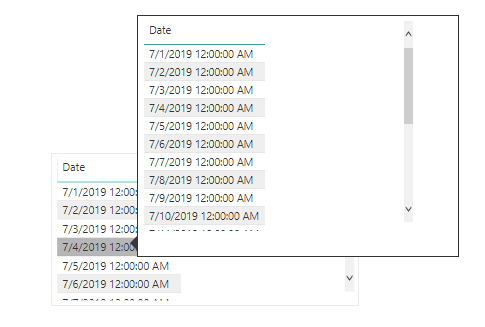
Not sure if you’d like to show the tooltip like this:

04.png

If so, you can follow below steps:

1.Create a report tooltip page, change the page size as tooltip, and the fill it with data.

  1. Turn the Tooltip slider to On, in the Page Information card, to make the page a tooltip.
  2. To set a tooltip manually, select the visual for which you want to specify the manual tooltip, then in the Visualizations pane, select the Format section and expand the Tooltip card.
  3. Then, in the Page dropdown, select the tooltip page you want to use for the selected visual. Note that only report pages that are specified as Tooltip pages show up in the dialog.


Please refer to the official document for more details: https://docs.microsoft.com/en-us/power-bi/desktop-tooltips


Best regards,

Dina Ye

Community Support Team _ Dina Ye
If this post helps, then please consider Accept it as the solution to help the other members find it more
quickly.
Anonymous
Not applicable

Hi Dina Ye, Thanks for the reply. So I know how to setup the tooltip and I have already done that. However, as you see in your screenshot as well, there is a slider in the tooltip. You can slide the tooltip slicer below to see all the rows. I'm looking for a way by which I can show all tooltip values on a single tooltip page. Therefore I was thinking of ways that could make the table flow horizontally after reaching the last line.

Hi @Anonymous 


Based on my research, if you’d like to scroll over the tooltip in the visual, it’s not accessible currently.

You can vote the idea same as yours in the portal: https://ideas.powerbi.com/forums/265200-power-bi-ideas/suggestions/33620479-tooltips


Alternatively, you can use drill through feature instead of tooltip:

https://docs.microsoft.com/en-us/power-bi/desktop-drillthrough


Best regards,

Dina Ye

Community Support Team _ Dina Ye
If this post helps, then please consider Accept it as the solution to help the other members find it more
quickly.

Helpful resources

Announcements
Power BI DataViz World Championships

Power BI Dataviz World Championships

The Power BI Data Visualization World Championships is back! Get ahead of the game and start preparing now!

December 2025 Power BI Update Carousel

Power BI Monthly Update - December 2025

Check out the December 2025 Power BI Holiday Recap!

FabCon Atlanta 2026 carousel

FabCon Atlanta 2026

Join us at FabCon Atlanta, March 16-20, for the ultimate Fabric, Power BI, AI and SQL community-led event. Save $200 with code FABCOMM.