Join us in Barcelona for FabCon and SQLCon, September 28 - October 1, 2026.
This is best Fabric, Power BI, SQL and AI community event. How do we know? The last event sold out! Save €200 with code FABCMTY200.
Register now- Power BI forums
- Get Help with Power BI
- Desktop
- Service
- Report Server
- Power Query
- Mobile Apps
- Developer
- DAX Commands and Tips
- Custom Visuals Development Discussion
- Health and Life Sciences
- Power BI Spanish forums
- Translated Spanish Desktop
- Training and Consulting
- Instructor Led Training
- Dashboard in a Day for Women, by Women
- Galleries
- Data Stories Gallery
- Themes Gallery
- Contests Gallery
- QuickViz Gallery
- Quick Measures Gallery
- Visual Calculations Gallery
- Fabric Apps Gallery
- Notebook Gallery
- Translytical Task Flow Gallery
- TMDL Gallery
- R Script Showcase
- Webinars and Video Gallery
- Ideas
- Custom Visuals Ideas (read-only)
- Issues
- Issues
- Events
- Upcoming Events
July 28 - August 9 | Final Round of the Power BI Dataviz World Championships. This is your chance. Learn more
- Power BI forums
- Forums
- Get Help with Power BI
- Desktop
- Re: Using a filter to filter two different tables
- Subscribe to RSS Feed
- Mark Topic as New
- Mark Topic as Read
- Float this Topic for Current User
- Bookmark
- Subscribe
- Printer Friendly Page

- Mark as New
- Bookmark
- Subscribe
- Mute
- Subscribe to RSS Feed
- Permalink
- Report Inappropriate Content
Using a filter to filter two different tables
I have a table which forecasts the units of each model that will be sold and a separate table which forecasts the volume of each model that will be sold. I also have a table which is much more complex and gives a detailed breakdown of all the products sold according to a specific region and customer and as well model. This table includes alot more models than the former table since the former tables only forecast for a particular category of models.
My first two tables look like this:
REGION Fin PRODUCT FY20 BUDGET
1 X
1 Y
1 Z
2 X
2 Y
2 Z
3 X
3 Y
3 Z
REGION Model FY20 Units
1 X
1 Y
1 Z
2 X
2 Y
2 Z
3 X
3 Y
3 Z
The other table(which details our actuals),a breakdown of the product and its parts sold but it has a region and a model column which does coincide with the columns from the previous table, although it has a greater variety of models than that of the previous table.
I'm using a clustered column chart to compare the actuals vs the forecast and i want to have a model filter. I've tried to create a R/S between the three tables but only one of the columns managed to get filtered by the model filter. Is it possible for a model filter to work on both columns.
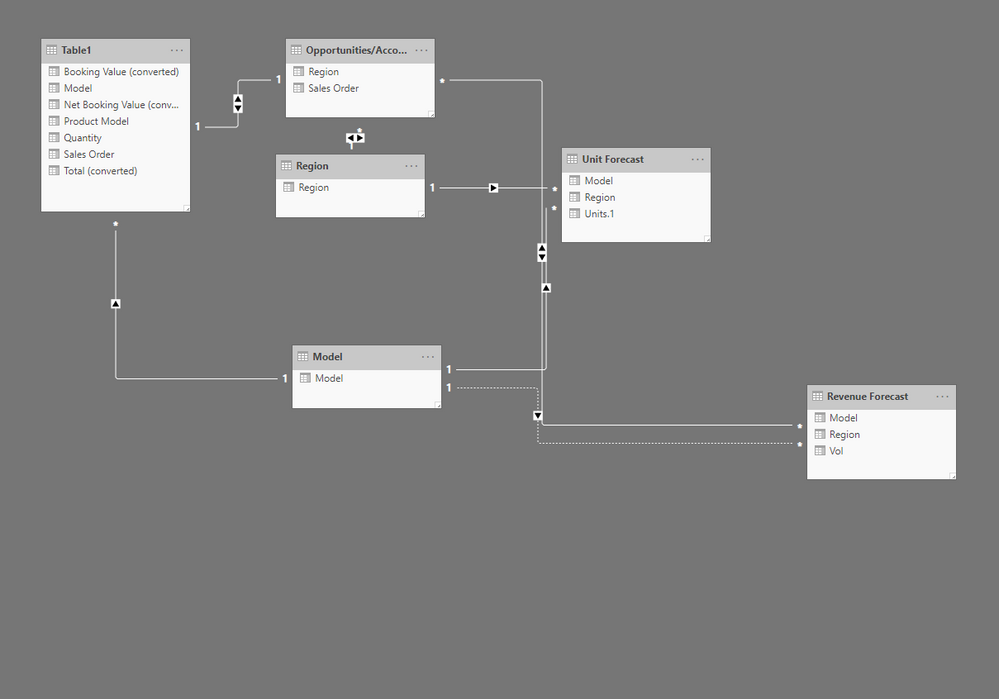
This is the relationship I have so far.
1 and 2 is the forecast in units and in volume whereas 3 is the detailed breakdown of our sales/actuals.

Thank you for your help!
Solved! Go to Solution.


- Mark as New
- Bookmark
- Subscribe
- Mute
- Subscribe to RSS Feed
- Permalink
- Report Inappropriate Content
@Anonymous,
Try this modified pbix of yours if this gets your desired filtering
- Mark as New
- Bookmark
- Subscribe
- Mute
- Subscribe to RSS Feed
- Permalink
- Report Inappropriate Content
@Anonymous,
So your expected output is?
Please provide a sample data and expected output to help you better
- Mark as New
- Bookmark
- Subscribe
- Mute
- Subscribe to RSS Feed
- Permalink
- Report Inappropriate Content
Hi,
This is the sample data.
https://drive.google.com/file/d/189AHJX6i0K 0fO5Qx40O7CZa8ZeKdM7gD/view?usp=sharing
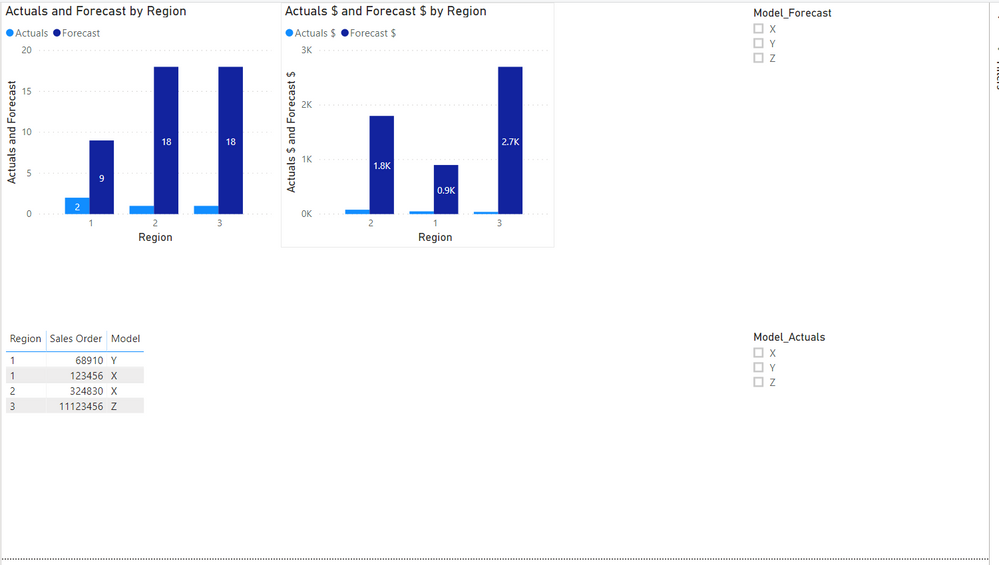
As you can see in the pic and in the pbix, i need two separate filters to make sure that each column is filtered down to the chosen model. Is it possible to have one filter only? So that both columns in each chart will be filtered correctly.
Thank you!
- Mark as New
- Bookmark
- Subscribe
- Mute
- Subscribe to RSS Feed
- Permalink
- Report Inappropriate Content
@Anonymous,
Try this modified pbix of yours if this gets your desired filtering
- Mark as New
- Bookmark
- Subscribe
- Mute
- Subscribe to RSS Feed
- Permalink
- Report Inappropriate Content
Hi @mussaenda ,
This worked well when we wanted to filter the actuals and budget diagram(in terms of units). But we've noticed that the filter isnt working on the budget portion of the other diagram(revenue actuals and budget). Is it possible for the filter to work for both diagrams and both columns for these diagrams?
Thank you!
- Mark as New
- Bookmark
- Subscribe
- Mute
- Subscribe to RSS Feed
- Permalink
- Report Inappropriate Content
@Anonymous,
Yes.
Create a relationship on the tables.
I just created relationships on the tables you required before that's why it is not reflecting on the revenue table.
- Mark as New
- Bookmark
- Subscribe
- Mute
- Subscribe to RSS Feed
- Permalink
- Report Inappropriate Content
- Mark as New
- Bookmark
- Subscribe
- Mute
- Subscribe to RSS Feed
- Permalink
- Report Inappropriate Content
Thanks! This worked well.
- Mark as New
- Bookmark
- Subscribe
- Mute
- Subscribe to RSS Feed
- Permalink
- Report Inappropriate Content
Helpful resources

FabCon & SQLCon – Barcelona 2026
Join us in Barcelona for FabCon and SQLCon, the Fabric, Power BI, SQL, and AI community event. Save €200 with code FABCMTY200.

Fabric Community Sticker Challenge - Barcelona 2026
If you love stickers, then you will definitely want to check out our community sticker challenge, Barcelona edition!

Power BI Monthly Update - July 2026
Check out the July 2026 Power BI update to learn about new features.

Power BI DataViz World Championships - June 2026
A new Power BI DataViz World Championship is coming this June! Don't miss out on submitting your entry.

| User | Count |
|---|---|
| 25 | |
| 23 | |
| 19 | |
| 17 | |
| 14 |


| User | Count |
|---|---|
| 24 | |
| 23 | |
| 20 | |
| 20 | |
| 19 |


