cancel
Showing results for 
Search instead for 
Did you mean: 

The Power BI Data Visualization World Championships is back! Get ahead of the game and start preparing now! Learn more

Reply
Anonymous
Not applicable

Using a different table for relationship based on a SELECTEDVALUE

Hi, here's where I'd need your help...


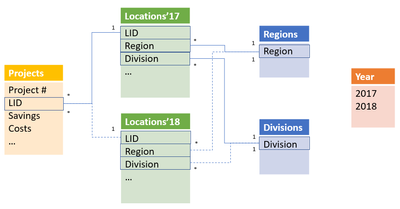
- I have 2 tables (lists of Locations (plants, offices, identified as LIDs) in my company: one list of 2017 locations, and one for 2018 locations. Each location refers to a region (Europe, Asia..) and to a Division in my company (which can change from one year to another).

- another independant one-column table with 2 values (2017 and 2018), allows me through a slicer to select the year I want to refer to in all my formulas/calculations/measures. In other words, selecting 2017 in this list should calculate measures based on the location list of 2017.

- on one side of the 2 locations lists (Locations'17 and Locations'18), I have a table listing the divisions, and another one listing regions.

- on the other side of these lists, I have a table of projects, each project being linked to a single LID. Values likes savings, and costs are also linked to each project.


the dataset looks like this:
Capture.PNG

I cannot suceed to use the SELECTEDVALUE of the Year table to say "based on this value, use this table (Locations'17) or this one {Locations'18)"... Any idea on how to proceed? I thought about appending both locations tables and adding a Year attributes, but couldn't figure it out...

Can you please advise?

Thx in advance,

Ben

1 ACCEPTED SOLUTION
Anonymous
Not applicable

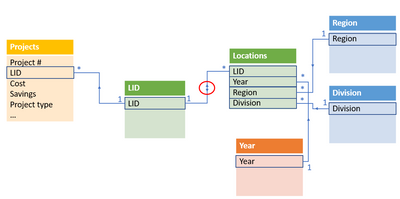
That was the right path... but not an easy one for me: I appended both locations tables into one, adding a Year column to the appended table and getting rid of duplicates LIDs. But then I had a many-to-many relationship between my location table and my project list table, so I had to create a one-column table with LIDs as a bridge table between the Location table and the Project list, allowing a both way relation between this bridge and the Project list... But it now works nicely! 😉

Thx again for your help @v-chuncz-msft

Capture.PNG

View solution in original post

3 REPLIES 3
v-chuncz-msft
Community Support
Community Support

@Anonymous,


You may use Append Queries (Table.Combine) in Query Editor or UNION Function (DAX) to create a new table.

Community Support Team _ Sam Zha
If this post helps, then please consider Accept it as the solution to help the other members find it more quickly.
Anonymous
Not applicable

@v-chuncz-msft,

Thx for your feedback. This was my initial idea as well, however it didn't seem to work as I wanted... But as you seem to say it's the most logical way, I'll reinvestigate that option...

Anonymous
Not applicable

That was the right path... but not an easy one for me: I appended both locations tables into one, adding a Year column to the appended table and getting rid of duplicates LIDs. But then I had a many-to-many relationship between my location table and my project list table, so I had to create a one-column table with LIDs as a bridge table between the Location table and the Project list, allowing a both way relation between this bridge and the Project list... But it now works nicely! 😉

Thx again for your help @v-chuncz-msft

Capture.PNG

Helpful resources

Announcements
Power BI DataViz World Championships

Power BI Dataviz World Championships

The Power BI Data Visualization World Championships is back! Get ahead of the game and start preparing now!

December 2025 Power BI Update Carousel

Power BI Monthly Update - December 2025

Check out the December 2025 Power BI Holiday Recap!

FabCon Atlanta 2026 carousel

FabCon Atlanta 2026

Join us at FabCon Atlanta, March 16-20, for the ultimate Fabric, Power BI, AI and SQL community-led event. Save $200 with code FABCOMM.