cancel
Showing results for 
Search instead for 
Did you mean: 

July 7 - July 17 | Round 2 of the Power BI Dataviz World Championships. Don't miss your chance! Learn more

Reply
lkshck
Helper III
Helper III

Using Text Filter for exact match

Hey, 

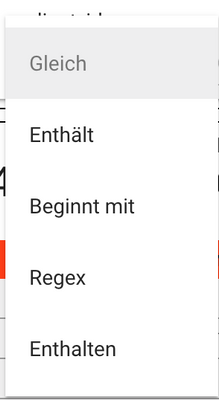
I'm currently using the Text filter from Microsoft to filter on the visuals. Unfortunately the Text filter uses the contains operation instead of equal. Is there any way to switch to equal instead of contains? Or maybe an option that the user can select which operation should be used in the Report? Something like this:

lkshck_0-1647247106593.png


1 ACCEPTED SOLUTION
amitchandak
Super User
Super User

@lkshck , When you use search in Normal slicer, that it force selection of exact value (Option under three dots)

Share with Power BI Enthusiasts: Full Power BI Video (20 Hours) YouTube
Microsoft Fabric Series 60+ Videos YouTube
Microsoft Fabric Hindi End to End YouTube

View solution in original post

6 REPLIES 6
truptis
Community Champion
Community Champion

@lkshck , We can also use custom visuals for text filtering -

  • Text Filter by Microsoft
  • Smart Filter by OkViz

Hope this helps you!

Solution with the search works for now, but isn't the best from my point of view. Currently used the Text Filter by Microsoft but this one uses the contains operation instead of equal. 

Thanks for the help.

truptis
Community Champion
Community Champion

Hi @lkshck
Option 1:

In a slicer, you can have this search option for exact match(Screenshot):

truptis_0-1647248269269.png

truptis_1-1647248359744.png

@lkshck -> if this helps you, then please mark this as a solution. Thanks.

Greg_Deckler
Community Champion
Community Champion

@lkshck Well, you could create your own measure for filtering. I call them Complex Selectors:

https://community.powerbi.com/t5/Quick-Measures-Gallery/The-Complex-Selector/m-p/1116633?search-acti...


Basically in your case maybe a slicer with the words and then something like:


Selector Measure = 
  VAR __Value = SELECTEDVALUE('Slicer'[Value])
RETURN
  IF(MAX('Table'[Column]) = __Value, 1, 0)


Follow on LinkedIn
@ me in replies or I'll lose your thread!!!
Instead of a Kudo, please vote for this idea
Become an expert!: Enterprise DNA
External Tools: MSHGQM
YouTube Channel!: Microsoft Hates Greg
Latest book!:
DAX For Humans

DAX is easy, CALCULATE makes DAX hard...

Trying to use your dax to build my expression.  I'm using the Microsoft Text Filter visual to find an exact match for a birth date.  There is a table visual in the report which will show the employee and birth exact match. If no exact match, no employees should show. 


All birthdays in the dataset are text fields formatted as 6 characters, 010176.


 I'm not sure how to apply the selected value to the search box.  Do I filter for 1? Or 0? On the search box or the visual table in the report?  Any help would be great. 

Selector Measure =
VAR __Value = SELECTEDVALUE(TABLE[BBD)
RETURN
IF(LEN(__Value) = 6 && MAX(TABLE[BBD) = __Value, 1, 0)

amitchandak
Super User
Super User

@lkshck , When you use search in Normal slicer, that it force selection of exact value (Option under three dots)

Share with Power BI Enthusiasts: Full Power BI Video (20 Hours) YouTube
Microsoft Fabric Series 60+ Videos YouTube
Microsoft Fabric Hindi End to End YouTube

Helpful resources

Announcements
FabCon and SQLCon Barcelona 2026

FabCon & SQLCon – Barcelona 2026

Join us in Barcelona for FabCon and SQLCon, the Fabric, Power BI, SQL, and AI community event. Save €200 with code FABCMTY200.

60 days of Data Days Carousel

Data Days 2026

Join Fabric Data Days 2026: 60 days of free live/on-demand sessions, challenges, study groups, and certification opportunities.

Power BI DataViz World Championships carousel

Power BI DataViz World Championships - June 2026

A new Power BI DataViz World Championship is coming this June! Don't miss out on submitting your entry.