This time we’re going bigger than ever. Fabric, Power BI, SQL, AI and more. We're covering it all. You won't want to miss it.
Learn moreDid you hear? There's a new SQL AI Developer certification (DP-800). Start preparing now and be one of the first to get certified. Register now
Hey,
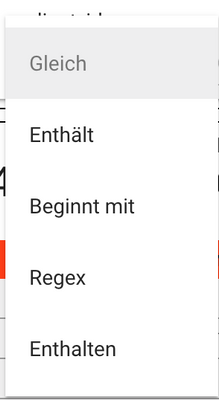
I'm currently using the Text filter from Microsoft to filter on the visuals. Unfortunately the Text filter uses the contains operation instead of equal. Is there any way to switch to equal instead of contains? Or maybe an option that the user can select which operation should be used in the Report? Something like this:
Solved! Go to Solution.
@lkshck , When you use search in Normal slicer, that it force selection of exact value (Option under three dots)
@lkshck , We can also use custom visuals for text filtering -
Hope this helps you!
Solution with the search works for now, but isn't the best from my point of view. Currently used the Text Filter by Microsoft but this one uses the contains operation instead of equal.
Thanks for the help.
@lkshck Well, you could create your own measure for filtering. I call them Complex Selectors:
Basically in your case maybe a slicer with the words and then something like:
Selector Measure =
VAR __Value = SELECTEDVALUE('Slicer'[Value])
RETURN
IF(MAX('Table'[Column]) = __Value, 1, 0)
Trying to use your dax to build my expression. I'm using the Microsoft Text Filter visual to find an exact match for a birth date. There is a table visual in the report which will show the employee and birth exact match. If no exact match, no employees should show.
All birthdays in the dataset are text fields formatted as 6 characters, 010176.
I'm not sure how to apply the selected value to the search box. Do I filter for 1? Or 0? On the search box or the visual table in the report? Any help would be great.
Selector Measure =
VAR __Value = SELECTEDVALUE(TABLE[BBD)
RETURN
IF(LEN(__Value) = 6 && MAX(TABLE[BBD) = __Value, 1, 0)
Check out the April 2026 Power BI update to learn about new features.
Sign up to receive a private message when registration opens and key events begin.
If you have recently started exploring Fabric, we'd love to hear how it's going. Your feedback can help with product improvements.
| User | Count |
|---|---|
| 36 | |
| 33 | |
| 31 | |
| 21 | |
| 16 |
| User | Count |
|---|---|
| 66 | |
| 55 | |
| 31 | |
| 24 | |
| 23 |