cancel
Showing results for 
Search instead for 
Did you mean: 

Level up your Power BI skills this month - build one visual each week and tell better stories with data! Get started

Reply
Matt_HD
Frequent Visitor

Using Salesforce report as a data source

Hi


Im using (plan to use) a Salesforce report as a data source, what i dont know is that do i need to refresh the report in Salesforce as more transactions happen for data to refresh in my report or will it just happen without me having to touch salesforce again?

1 ACCEPTED SOLUTION
V-lianl-msft
Community Support
Community Support

Hi @Matt_HD ,


After you publish the SalesForce reports to Power BI Service, go to Settings->Datasets and find your dataset, you should find that Power BI Service connect directly to your SalesForce data source, after you edit the credential for your data source, you  are able to schedule the dataset to refresh daily or schedule it to refresh in different date time, but please note the refresh frequency can be up to eight times per day. 

You need to enter the same credentials in the power Bi service that are used to connect to the salesforce report in the power Bi desktop.


Best Regards,
Liang
If this post helps, then please consider Accept it as the solution to help the other members find it more quickly.

View solution in original post

4 REPLIES 4
metrica
Helper IV
Helper IV

Hi @Matt_HD,


Quick 2026 update for your question and anyone landing here from search:


You don't need to manually refresh the Salesforce report itself - Power BI queries the Salesforce Reports API at each refresh, which returns live data from the underlying Salesforce records (not a static snapshot). So as new transactions happen in Salesforce, the next Power BI refresh will pick them up automatically.


You control refresh frequency in Power BI: manual refreshes anytime in Desktop, and scheduled refreshes in the Service (Pro license: up to 8 refreshes/day; PPU/Premium: up to 48/day).


One thing to keep in mind: the Salesforce Reports API caps each call at 2,000 rows. So if your report grows beyond that, the rest gets silently dropped on each refresh - and your dashboard will look incomplete without any obvious error.


If your report stays under 2K rows, the native connector works fine. If you expect it to grow past that, Power BI Connector for Salesforce on AppExchange pulls Salesforce reports without the 2K cap, so your full report comes through on every refresh.


Free 30-day trial if you'd like to test it. Details at https://metricasoftware.com/, demo available on request.


Cheers,

Metrica Team.

ReportMaster
Post Partisan
Post Partisan

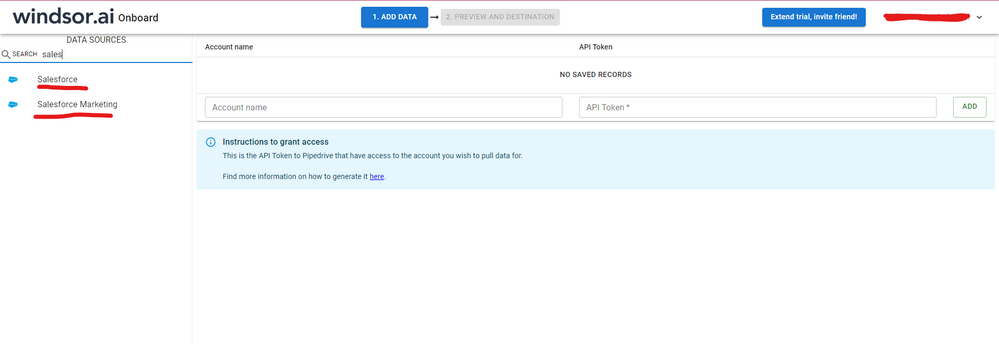
Hi @Matt_HD were you able to find a solution? As a workardound, maybe you can try to test your connection with a 3rd party connector. I've tried windsor.ai, supermetrics (which doesn't have PBI as a destination, so you first have to export to Google Sheets and then export to PBI) and funnel.io. I stayed with windsor because it is much cheaper so just to let you know other options. In case you wonder, to make the connection first search for the Salesforce connector in the data sources list:


SALESFORCE-1.png


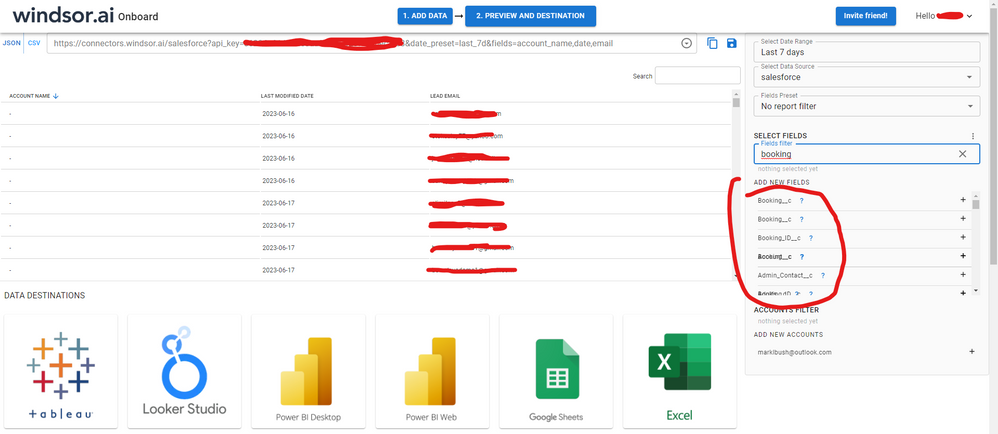
After that, just grant access to your Salesforce account using your credentials, then on preview and destination page you will see a preview of your Salesforce fields:


SALESFORCE-2.png


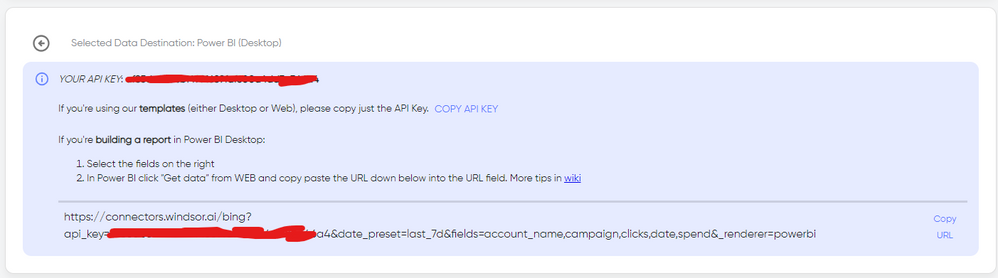
There just select the fields you need. It is also compatible with custom fields and custom objects, so you'll be able to export them through windsor.  Finally, just select PBI as your data destination and finally just copy and paste the url on PBI --> Get Data --> Web --> Paste the url. 


SELECT_DESTINATION_NEW.png

V-lianl-msft
Community Support
Community Support

Hi @Matt_HD ,


After you publish the SalesForce reports to Power BI Service, go to Settings->Datasets and find your dataset, you should find that Power BI Service connect directly to your SalesForce data source, after you edit the credential for your data source, you  are able to schedule the dataset to refresh daily or schedule it to refresh in different date time, but please note the refresh frequency can be up to eight times per day. 

You need to enter the same credentials in the power Bi service that are used to connect to the salesforce report in the power Bi desktop.


Best Regards,
Liang
If this post helps, then please consider Accept it as the solution to help the other members find it more quickly.

BartStruyf
Regular Visitor

Hi, 


Using reports as input is not a good idea. You only get about 2000 records.  It is better to get the source datatables from salesforce (very easy to import in power BI) and make your reports in power bi.  You have a lot more possibilities to build reports, in salesforce it is limited to make reports based on different entitities.


If you publish the report to power bi service you can schedule an automated update and always have te latest date in your dashboard.


kind regards,

Bart

Helpful resources

Announcements
Fabric SQL PBI Data Days

Data Days 2026 coming soon!

Sign up to receive a private message when registration opens and key events begin.

New to Fabric survey Carousel

New to Fabric Survey

If you have recently started exploring Fabric, we'd love to hear how it's going. Your feedback can help with product improvements.

Power BI DataViz World Championships carousel

Power BI DataViz World Championships - June 2026

A new Power BI DataViz World Championship is coming this June! Don't miss out on submitting your entry.