Join us at FabCon Atlanta from March 16 - 20, 2026, for the ultimate Fabric, Power BI, AI and SQL community-led event. Save $200 with code FABCOMM.
Register now!The Power BI Data Visualization World Championships is back! Get ahead of the game and start preparing now! Learn more
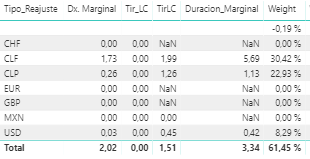
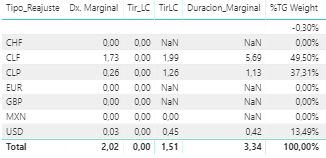
Hi, I'm trying to calculate the total weight (61.45%) as a measure, so later I could divide other columns by that value (0.6145). It's similar as having %GT but as a measure for calculations.
Any insights?
Normal Weight
%TG Weight
@Anonymous ,
You can convert [Weight] from measure to calculate column then create a measure using DAX below:
Grand Total = SUM ( Table[Weight] )
Community Support Team _ Jimmy Tao
If this post helps, then please consider Accept it as the solution to help the other members find it more quickly.
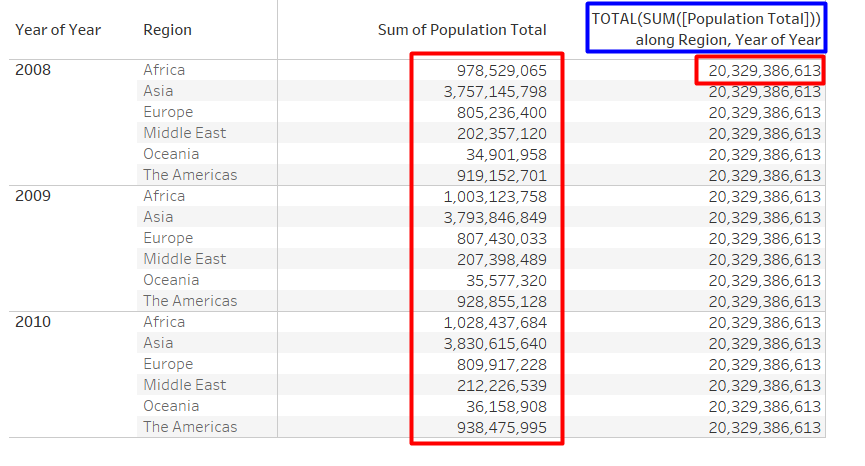
The idea is something like this.
@Anonymous ,
Modify calculate column like below:
Grand Total =
CALCULATE (
SUM ( Table[Weight] ),
ALLEXCEPT ( Table, Table[Year of Year], Table[Region] )
)
Community Support Team _ Jimmy Tao
If this post helps, then please consider Accept it as the solution to help the other members find it more quickly.
For calculating the TOTAL:
Total= (CALCULATE(SUM(Population);ALL(Year)))
Then you create another measure with Population/Total for the weight.
The problem with this is that when I try to use it later as a total grand sum, it calculates the SUM ( weight) for each row, and not as a total.
Take a look at this Quick Measure, Measure Totals, The Final Word should get you what you need:
https://community.powerbi.com/t5/Quick-Measures-Gallery/Measure-Totals-The-Final-Word/m-p/547907
Obviously your exact requirement is a little different, but the technique described should get you where you want to be.
The Power BI Data Visualization World Championships is back! Get ahead of the game and start preparing now!
| User | Count |
|---|---|
| 41 | |
| 39 | |
| 37 | |
| 29 | |
| 24 |
| User | Count |
|---|---|
| 124 | |
| 107 | |
| 80 | |
| 69 | |
| 67 |