cancel
Showing results for 
Search instead for 
Did you mean: 

July 7 - July 17 | Round 2 of the Power BI Dataviz World Championships. Don't miss your chance! Learn more

Reply
cplesner
Helper III
Helper III

Using Parameters for SQL Server Username/Password

Hi


I can set Parameter for Servername and Database name, but how to set parameters for Username/Password when the connection is to SQL server database with Basic Authentication (azure SQL DB)

1 ACCEPTED SOLUTION

Hi @cplesner,


I am assuming that you have exported a template after creating a Power BI desktop report which is going to be shared with the custimer.
Also, it contains Database and Server as parameters so that customers can enter their own.
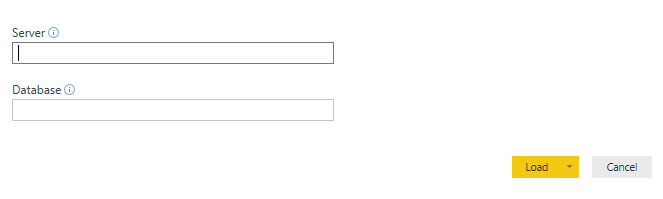
The point to note here is when database and server names are submitted, Power BI does ask the credentials to be used for the first time. Refer below screenshot:
Solution1.PNGSolution2.PNG


So the customers will be able to access the report only when they enter credentials alloted to them.
Hope thats what you were looking for.

Thanks !!

View solution in original post

3 REPLIES 3
v-yulgu-msft
Microsoft Employee
Microsoft Employee

Hi @cplesner,


As per my knowledge, parameters are used to load dynamic source data. usually, we create parameters based on below scenarios:

  • Parameterising a Data Source
  • Using Query Parameters in Filter Rows


Fisrt of all, we should have access permission to data source, so that we can connect to data source using valid credentials, then, we are able to use parameters to filter data. In short, it is not possible to set parameter for username/password. If you want to switch the username/password, you can open the data source settings pane. File -> Options and Settings -> Data Source settings

2.PNG


Regards,
Yuliana Gu

Community Support Team _ Yuliana Gu
If this post helps, then please consider Accept it as the solution to help the other members find it more quickly.

Thanks for the feedback. It's just in our case we have one database pr customer. The databases have same structure but data is of course idfferent pr customer and so is their username and password. so it would be nice to parameterize that as well. So initially the connection is to the demo database, but each customer could then change dbname and submit their username/password and then refresh

Hi @cplesner,


I am assuming that you have exported a template after creating a Power BI desktop report which is going to be shared with the custimer.
Also, it contains Database and Server as parameters so that customers can enter their own.
The point to note here is when database and server names are submitted, Power BI does ask the credentials to be used for the first time. Refer below screenshot:
Solution1.PNGSolution2.PNG


So the customers will be able to access the report only when they enter credentials alloted to them.
Hope thats what you were looking for.

Thanks !!

Helpful resources

Announcements
FabCon and SQLCon Barcelona 2026

FabCon & SQLCon – Barcelona 2026

Join us in Barcelona for FabCon and SQLCon, the Fabric, Power BI, SQL, and AI community event. Save €200 with code FABCMTY200.

60 days of Data Days Carousel

Data Days 2026

Join Fabric Data Days 2026: 60 days of free live/on-demand sessions, challenges, study groups, and certification opportunities.

Power BI DataViz World Championships carousel

Power BI DataViz World Championships - June 2026

A new Power BI DataViz World Championship is coming this June! Don't miss out on submitting your entry.