cancel
Showing results for 
Search instead for 
Did you mean: 

July 7 - July 17 | Round 2 of the Power BI Dataviz World Championships. Don't miss your chance! Learn more

Reply
zahidah_mabd
Helper I
Helper I

Using NOT and IN function

Hi, I want to filter values which is not in the list provided.

Here is my measure but it filters the valua that I want to exclude.

Sum Incorrect Technical Professional SG = 

CALCULATE( COUNTROWS('zhpla'),

FILTER(

'zhpla',

'zhpla'[Position Category] = "Technical Professional (TP)" &&

'zhpla'[Employee Assignment Category]

IN {"Permanent ~ Executive","Permanent ~ Management" } &&

NOT ('zhpla'[Employee Assignment Category] IN {"P1", "P2", "P3", "P4", "P5", "P6", "P7", "P8", "P9", "P10", "P11", "P12", "P13", "P14" })

)

)+0

can you help me?

2 REPLIES 2
jdbuchanan71
Super User
Super User

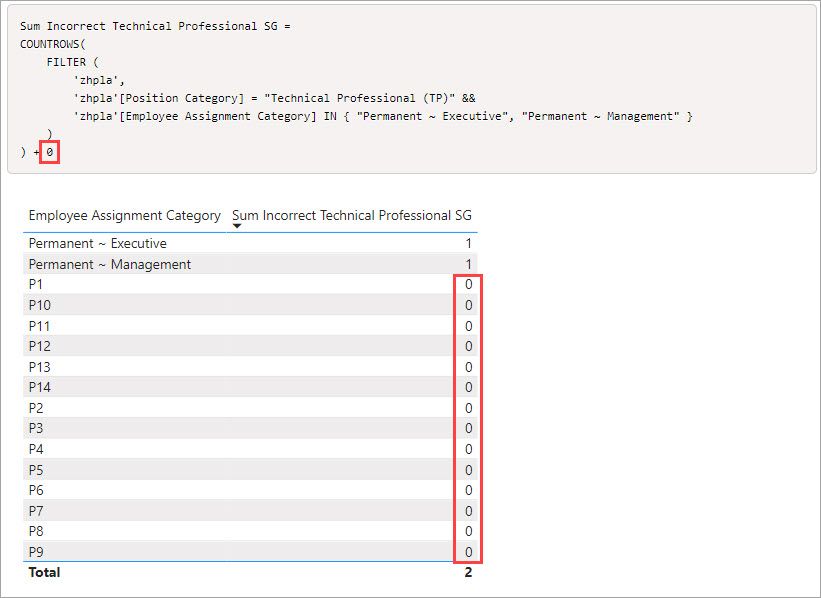
In my test the result is what I would expect.  You can simplify the measure some, first the NOT IN does not need to be there because this line already limits it to just 2 categories.  The {P1..P14} are already excluded.

'zhpla'[Employee Assignment Category] IN { "Permanent ~ Executive", "Permanent ~ Management" }

You can also just count the filter so it ends up like this.

Sum Incorrect Technical Professional SG = 
COUNTROWS(
    FILTER (
        'zhpla',
        'zhpla'[Position Category] = "Technical Professional (TP)" &&
		'zhpla'[Employee Assignment Category] IN { "Permanent ~ Executive", "Permanent ~ Management" }
    )
) + 0

Now, if you are saying that the lines still show up in a table with this measure in it, that is because of the +0 forcing the measure to return a result.  So if you want to get rid of that behaviour, remove the +0

2022-06-25_23-34-46.jpg

danextian
Super User
Super User

Hi @zahidah_mabd,
Please note of the position of "(".  I have placed it before NOT.

Sum Incorrect Technical Professional SG =
CALCULATE (
    COUNTROWS ( 'zhpla' ),
    FILTER (
        'zhpla',
        'zhpla'[Position Category] = "Technical Professional (TP)"
            && 'zhpla'[Employee Assignment Category]
            IN { "Permanent ~ Executive", "Permanent ~ Management" }
            && ( NOT 'zhpla'[Employee Assignment Category]
            IN {
            "P1",
            "P2",
            "P3",
            "P4",
            "P5",
            "P6",
            "P7",
            "P8",
            "P9",
            "P10",
            "P11",
            "P12",
            "P13",
            "P14"
        } )
    )
) + 0


Dane Belarmino | Microsoft MVP | Proud to be a Super User!

Did I answer your question? Mark my post as a solution!


"Tell me and I’ll forget; show me and I may remember; involve me and I’ll understand."
Need Power BI consultation, get in touch with me on LinkedIn or hire me on UpWork.
Learn with me on YouTube @DAXJutsu or follow my page on Facebook @DAXJutsuPBI.

Helpful resources

Announcements
FabCon and SQLCon Barcelona 2026

FabCon & SQLCon – Barcelona 2026

Join us in Barcelona for FabCon and SQLCon, the Fabric, Power BI, SQL, and AI community event. Save €200 with code FABCMTY200.

60 days of Data Days Carousel

Data Days 2026

Join Data Days 2026: 60 days of free live/on-demand sessions, challenges, study groups, and certification opportunities.

Power BI DataViz World Championships carousel

Power BI DataViz World Championships - June 2026

A new Power BI DataViz World Championship is coming this June! Don't miss out on submitting your entry.

Top Solution Authors