This time we’re going bigger than ever. Fabric, Power BI, SQL, AI and more. We're covering it all. You won't want to miss it.
Learn moreLevel up your Power BI skills this month - build one visual each week and tell better stories with data! Get started
Hi, I want to filter values which is not in the list provided.
Here is my measure but it filters the valua that I want to exclude.
Sum Incorrect Technical Professional SG =
CALCULATE( COUNTROWS('zhpla'),
FILTER(
'zhpla',
'zhpla'[Position Category] = "Technical Professional (TP)" &&
'zhpla'[Employee Assignment Category]
IN {"Permanent ~ Executive","Permanent ~ Management" } &&
NOT ('zhpla'[Employee Assignment Category] IN {"P1", "P2", "P3", "P4", "P5", "P6", "P7", "P8", "P9", "P10", "P11", "P12", "P13", "P14" })
)
)+0
can you help me?
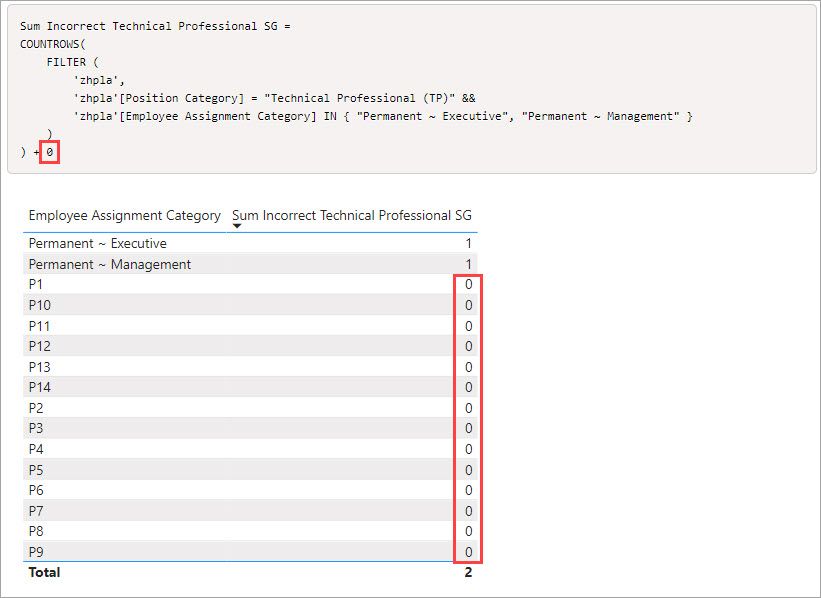
In my test the result is what I would expect. You can simplify the measure some, first the NOT IN does not need to be there because this line already limits it to just 2 categories. The {P1..P14} are already excluded.
'zhpla'[Employee Assignment Category] IN { "Permanent ~ Executive", "Permanent ~ Management" }
You can also just count the filter so it ends up like this.
Sum Incorrect Technical Professional SG =
COUNTROWS(
FILTER (
'zhpla',
'zhpla'[Position Category] = "Technical Professional (TP)" &&
'zhpla'[Employee Assignment Category] IN { "Permanent ~ Executive", "Permanent ~ Management" }
)
) + 0
Now, if you are saying that the lines still show up in a table with this measure in it, that is because of the +0 forcing the measure to return a result. So if you want to get rid of that behaviour, remove the +0
Hi @zahidah_mabd,
Please note of the position of "(". I have placed it before NOT.
Sum Incorrect Technical Professional SG =
CALCULATE (
COUNTROWS ( 'zhpla' ),
FILTER (
'zhpla',
'zhpla'[Position Category] = "Technical Professional (TP)"
&& 'zhpla'[Employee Assignment Category]
IN { "Permanent ~ Executive", "Permanent ~ Management" }
&& ( NOT 'zhpla'[Employee Assignment Category]
IN {
"P1",
"P2",
"P3",
"P4",
"P5",
"P6",
"P7",
"P8",
"P9",
"P10",
"P11",
"P12",
"P13",
"P14"
} )
)
) + 0
Check out the April 2026 Power BI update to learn about new features.
Sign up to receive a private message when registration opens and key events begin.
If you have recently started exploring Fabric, we'd love to hear how it's going. Your feedback can help with product improvements.
| User | Count |
|---|---|
| 37 | |
| 29 | |
| 29 | |
| 21 | |
| 18 |
| User | Count |
|---|---|
| 68 | |
| 39 | |
| 33 | |
| 24 | |
| 23 |