cancel
Showing results for 
Search instead for 
Did you mean: 

The Power BI Data Visualization World Championships is back! Get ahead of the game and start preparing now! Learn more

Reply
Anonymous
Not applicable

Using Multiple Identical Data Sets for the Same Visuals

Hello,


I am new to the forums and I have looked around and not had any luck answering this question.


I will explain in a little more detail:


I have a large dataset I would like to break up by month.  An example of the data would be as follows:


Date            Name           ID           Country          Region         # of Sales             Total Revenue


I would like to bring this data in through several different CSV files (by month) and create visuals as if it were 1 large dataset.  So if i had 6 sets of data for January through June and i wanted to make a bar chart for total sales by month - would that be possible?


Please let me know if there is already a thread explaining this - if it is possible and how i would go about formatting it.


Thanks!

1 ACCEPTED SOLUTION
amitchandak
Super User
Super User

You can append the data

https://radacad.com/append-vs-merge-in-power-bi-and-power-query

if needed

https://radacad.com/pivot-and-unpivot-with-power-bi


Preferably convert Month into month start or end date and use date dimension that will make time intelligence easy.


To get the best of the time intelligence function. Make sure you have a date calendar and it has been marked as the date in model view. Also, join it with the date column of your fact/s. Refer :
https://radacad.com/creating-calendar-table-in-power-bi-using-dax-functions
https://www.archerpoint.com/blog/Posts/creating-date-table-power-bi
https://www.sqlbi.com/articles/creating-a-simple-date-table-in-dax/


Appreciate your Kudos.  mark me with @ for more information

Share with Power BI Enthusiasts: Full Power BI Video (20 Hours) YouTube
Microsoft Fabric Series 60+ Videos YouTube
Microsoft Fabric Hindi End to End YouTube

View solution in original post

4 REPLIES 4
Ashish_Mathur
Super User
Super User

Hi,

Try this

  1. Append data from the multiple CSV files
  2. Create a Calendar Table and build a relationship from the Date column of the appended dataset to the Date column of the Calendar Table
  3. In the Calendar Table, write calculated column formulas to extract Year and Month: Year = year(calendar[Date]), Month Name = FORMAT(Calendar[Date],"mmmm") and Month Number = MONTH(Calendar[Date])
  4. Click on any one cell in the Month Name column and then go to Sort by column > Month Number
  5. To your visual, drag Year and Month from the Calendar Table.
  6. Write this measure

Revenue = SUM(Data[Total revenue])


Hope this helps.


Regards,
Ashish Mathur
http://www.ashishmathur.com
https://www.linkedin.com/in/excelenthusiasts/
v-kelly-msft
Community Support
Community Support

Hi @Anonymous ,


Yes, append queries is an easiest and fastest way to achieve it:

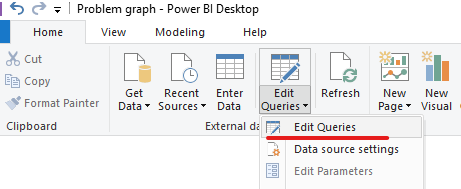
Go to Home>edit queries:

Annotation 2020-03-09 110748.png

You can choose append queries as new if you wanna keep the previous queries:

Annotation 2020-03-09 110833.png


Here is a related reference.


Best Regards,
Kelly
Did I answer your question? Mark my post as a solution!
Greg_Deckler
Community Champion
Community Champion

You could use an Append query but the easiest thing to do would be to put all the CSV files in a folder and use a Folder query.


Follow on LinkedIn
@ me in replies or I'll lose your thread!!!
Instead of a Kudo, please vote for this idea
Become an expert!: Enterprise DNA
External Tools: MSHGQM
YouTube Channel!: Microsoft Hates Greg
Latest book!:
DAX For Humans

DAX is easy, CALCULATE makes DAX hard...
amitchandak
Super User
Super User

You can append the data

https://radacad.com/append-vs-merge-in-power-bi-and-power-query

if needed

https://radacad.com/pivot-and-unpivot-with-power-bi


Preferably convert Month into month start or end date and use date dimension that will make time intelligence easy.


To get the best of the time intelligence function. Make sure you have a date calendar and it has been marked as the date in model view. Also, join it with the date column of your fact/s. Refer :
https://radacad.com/creating-calendar-table-in-power-bi-using-dax-functions
https://www.archerpoint.com/blog/Posts/creating-date-table-power-bi
https://www.sqlbi.com/articles/creating-a-simple-date-table-in-dax/


Appreciate your Kudos.  mark me with @ for more information

Share with Power BI Enthusiasts: Full Power BI Video (20 Hours) YouTube
Microsoft Fabric Series 60+ Videos YouTube
Microsoft Fabric Hindi End to End YouTube

Helpful resources

Announcements
November Power BI Update Carousel

Power BI Monthly Update - November 2025

Check out the November 2025 Power BI update to learn about new features.

Fabric Data Days Carousel

Fabric Data Days

Advance your Data & AI career with 50 days of live learning, contests, hands-on challenges, study groups & certifications and more!

FabCon Atlanta 2026 carousel

FabCon Atlanta 2026

Join us at FabCon Atlanta, March 16-20, for the ultimate Fabric, Power BI, AI and SQL community-led event. Save $200 with code FABCOMM.

Top Kudoed Authors