cancel
Showing results for 
Search instead for 
Did you mean: 

We've captured the moments from FabCon & SQLCon that everyone is talking about, and we are bringing them to the community, live and on-demand. Starts on April 14th. Register now

Reply
masplin
Impactful Individual

Using Matrix with odd rows structure

I have a client requesting a table that looks like this.  The problem is the heirachy they want is based on 3 different fields,

  1. Job Type: Newin, removal etc
  2. Major project: Y/N 
  3. Customer name: QEF is one very large contract that is also a MP


Capture.PNG

If I put Major project then Job Type then Customer name on the rows of the matrix I can use the + button to hide all the cusotmers in the top part (the are MP=N).  I coudl collpase all of the MP=Y section, but then cant see the one row for QEF. Also The MP orange number needs to be all jobs that are MP except the QEF one.


So the question is whether this s possible in power BI?  Do I create a column and classify each line to where it fits on the table?  


Thanks ofr any advice

Mike

1 ACCEPTED SOLUTION

Hi @masplin 

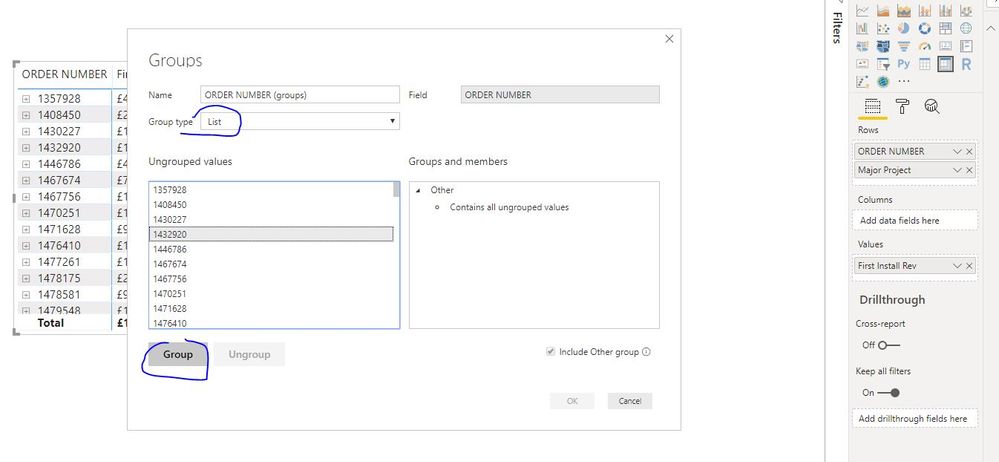
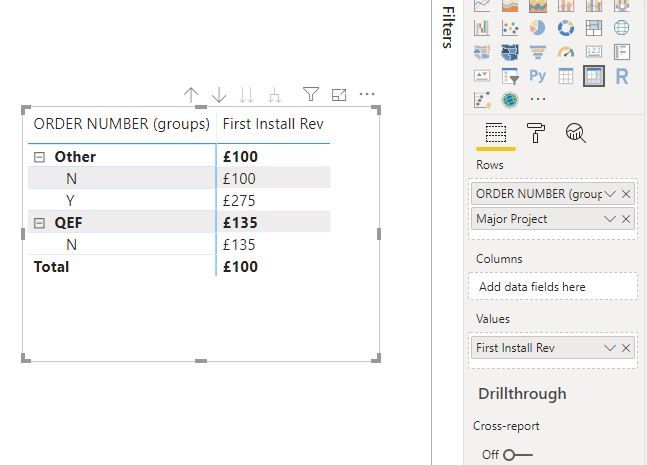
You could use "group and bins", it can partly achieve your requirements.

Capture6.JPGCapture8.JPG

Best Regards
Maggie
Community Support Team _ Maggie Li
If this post helps, then please consider Accept it as the solution to help the other members find it more quickly.

View solution in original post

4 REPLIES 4
v-juanli-msft
Community Support
Community Support

Hi @masplin 

Sorry, i'm not clear about your table structure.

Do you have the table as below

Capture4.JPG

Then want the columns to show on rows as the right one.

level 1, level 2, level 3
 
Best Regards
Maggie
Community Support Team _ Maggie Li
If this post helps, then please consider Accept it as the solution to help the other members find it more quickly.

Hi Maggie


Attached is an example of my data (its actually made up of related tables)


Data 

So a normal matrix would look like this
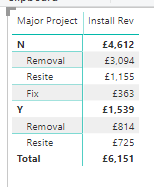
Capture.PNG

However the customer want the "Y" bit of the table to be split between one speciifc project for cusotmer X and the rest instead of being split by "Group" as for the "N" bit of the table.


One way of doing this is to create a new column in my datatable like this and then use this field instead of the [Major project] field in my matrix.  


Daily = IF('ASC'[Order Number]="1431027","QEF",IF('ASC'[Major Project]="Y","Other MP","Net Dom"))

This sort of works, but wondered if there was a more flexible way to show subsets of data. For example if we put "Customer" in the matrix we can either have the total or expand it to show the number for each cusotmer.  What if I wanted to show subtotals for all the cusotmers begining with "A" and another total for the rest.  I could create a calcuated column as above, but is that the only way or can it be done with DAX?


Thanks

Mike 

Hi @masplin 

You could use "group and bins", it can partly achieve your requirements.

Capture6.JPGCapture8.JPG

Best Regards
Maggie
Community Support Team _ Maggie Li
If this post helps, then please consider Accept it as the solution to help the other members find it more quickly.

Ah brilliant just what i needed.

Helpful resources

Announcements
New to Fabric survey Carousel

New to Fabric Survey

If you have recently started exploring Fabric, we'd love to hear how it's going. Your feedback can help with product improvements.

Power BI DataViz World Championships carousel

Power BI DataViz World Championships - June 2026

A new Power BI DataViz World Championship is coming this June! Don't miss out on submitting your entry.

Join our Fabric User Panel

Join our Fabric User Panel

Share feedback directly with Fabric product managers, participate in targeted research studies and influence the Fabric roadmap.

March Power BI Update Carousel

Power BI Community Update - March 2026

Check out the March 2026 Power BI update to learn about new features.