
cancel
Showing results for 
Search instead for 
Did you mean: 

The Power BI Data Visualization World Championships is back! It's time to submit your entry. Live now!

Reply
Anonymous
Not applicable

Using M Query in Power Query Editor to Count across multiple columns

Afternoon,


Not sure if this is possible - I have about 20 columns in a dataset which contain either the value: Pass, Fail or N/A

I want to create a 'Total checked' column which will count across all 20 columns and sum the instances of Pass and Fail, ignoring N/A. 


So in a single row, if 'Pass' in 2 columns, 'Fail' in 2 columns, 'N/A' in 2 columns, the new colum would result a 4. SampleData.PNG


1 ACCEPTED SOLUTION
Zubair_Muhammad
Community Champion
Community Champion

Hi @Anonymous


You can do like this


First Step


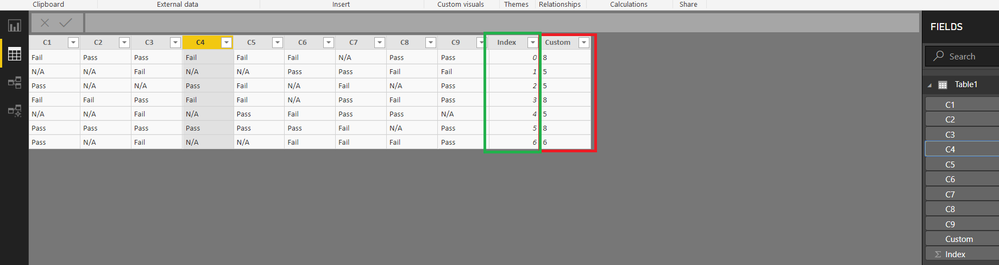
Add an index column (From 0)

Final Step

add this custom column

List.Count(
List.Select(
Record.ToList(AddedIndex{[Index]}),
each _ ="Pass" or _ ="Fail")
            )


AddedIndex refers to previousstep in your M code

View solution in original post

6 REPLIES 6
Zubair_Muhammad
Community Champion
Community Champion

Hi @Anonymous


You can do like this


First Step


Add an index column (From 0)

Final Step

add this custom column

List.Count(
List.Select(
Record.ToList(AddedIndex{[Index]}),
each _ ="Pass" or _ ="Fail")
            )


AddedIndex refers to previousstep in your M code

Anonymous
Not applicable

@Zubair_Muhammad you, sir, are a genious. 

@Anonymous


Please see attached file's Query Editor with some sample data


countacrossrows.png

Anonymous
Not applicable

@Zubair_Muhammad I have a second challenge for you.


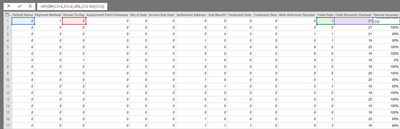
Below is an excel equivalent of what I want to do in Power Query Editor with a new Custom Column - I want to create a [Fail Ratio] which takes the sum of Fails from the Total Checks to give a percentage. Easy.

Did that using [Total Fail]/[Total Checks] 

But there are two elements - [Patient Name] and [Person to Pay] where if they fail, the [Fail Ratio] should be a complete fail, irrespective of whether these are only these two fails. 

So I need the measure to give complete fail if [Patient Name] or [Person to Pay]="Fail", else [Total Fail]/[Total Checks]


Excel.png

@Anonymous


Sorry I missed your last reply


You can use a custom column like


=if
List.Contains({[Patient Name],[Person To Pay]},"Fail")
then
0
else
[Total Fail]/[Total Checks]

Helpful resources

Announcements
Power BI DataViz World Championships

Power BI Dataviz World Championships

The Power BI Data Visualization World Championships is back! It's time to submit your entry.

January Power BI Update Carousel

Power BI Monthly Update - January 2026

Check out the January 2026 Power BI update to learn about new features.

FabCon Atlanta 2026 carousel

FabCon Atlanta 2026

Join us at FabCon Atlanta, March 16-20, for the ultimate Fabric, Power BI, AI and SQL community-led event. Save $200 with code FABCOMM.