Get Fabric or SQL Certified for Free.
Get certified for free when you join Fabric Data Days 2026 and dive into Fabric, Power BI, SQL, AI, and other essential data skills.
Join now- Power BI forums
- Get Help with Power BI
- Desktop
- Service
- Report Server
- Power Query
- Mobile Apps
- Developer
- DAX Commands and Tips
- Custom Visuals Development Discussion
- Health and Life Sciences
- Power BI Spanish forums
- Translated Spanish Desktop
- Training and Consulting
- Instructor Led Training
- Dashboard in a Day for Women, by Women
- Galleries
- Data Stories Gallery
- Themes Gallery
- Contests Gallery
- QuickViz Gallery
- Quick Measures Gallery
- Visual Calculations Gallery
- Notebook Gallery
- Translytical Task Flow Gallery
- TMDL Gallery
- R Script Showcase
- Webinars and Video Gallery
- Ideas
- Custom Visuals Ideas (read-only)
- Issues
- Issues
- Events
- Upcoming Events
Try your skills in the Power BI Dataviz World Championship! Round one ends June 26. Join now
- Power BI forums
- Forums
- Get Help with Power BI
- Desktop
- Re: Using M Query in Power Query Editor to Count a...
- Subscribe to RSS Feed
- Mark Topic as New
- Mark Topic as Read
- Float this Topic for Current User
- Bookmark
- Subscribe
- Printer Friendly Page

- Mark as New
- Bookmark
- Subscribe
- Mute
- Subscribe to RSS Feed
- Permalink
- Report Inappropriate Content
Using M Query in Power Query Editor to Count across multiple columns
Afternoon,
Not sure if this is possible - I have about 20 columns in a dataset which contain either the value: Pass, Fail or N/A
I want to create a 'Total checked' column which will count across all 20 columns and sum the instances of Pass and Fail, ignoring N/A.
So in a single row, if 'Pass' in 2 columns, 'Fail' in 2 columns, 'N/A' in 2 columns, the new colum would result a 4.
Solved! Go to Solution.


- Mark as New
- Bookmark
- Subscribe
- Mute
- Subscribe to RSS Feed
- Permalink
- Report Inappropriate Content
Hi @Anonymous
You can do like this
First Step
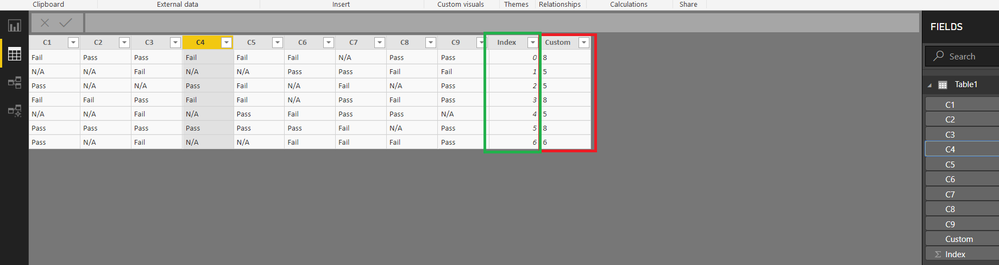
Add an index column (From 0)
Final Step
add this custom column
List.Count(
List.Select(
Record.ToList(AddedIndex{[Index]}),
each _ ="Pass" or _ ="Fail")
            )
AddedIndex refers to previousstep in your M code
Regards
Zubair
Please try my custom visuals
- Mark as New
- Bookmark
- Subscribe
- Mute
- Subscribe to RSS Feed
- Permalink
- Report Inappropriate Content
Hi @Anonymous
You can do like this
First Step
Add an index column (From 0)
Final Step
add this custom column
List.Count(
List.Select(
Record.ToList(AddedIndex{[Index]}),
each _ ="Pass" or _ ="Fail")
            )
AddedIndex refers to previousstep in your M code
Regards
Zubair
Please try my custom visuals

- Mark as New
- Bookmark
- Subscribe
- Mute
- Subscribe to RSS Feed
- Permalink
- Report Inappropriate Content
Do you mind advising to my query, please?
https://community.powerbi.com/t5/Desktop/How-to-create-Clustered-Column-Chart-without-counting-Blank...
Thank you.
- Mark as New
- Bookmark
- Subscribe
- Mute
- Subscribe to RSS Feed
- Permalink
- Report Inappropriate Content
- Mark as New
- Bookmark
- Subscribe
- Mute
- Subscribe to RSS Feed
- Permalink
- Report Inappropriate Content
@Anonymous
Please see attached file's Query Editor with some sample data
Regards
Zubair
Please try my custom visuals
- Mark as New
- Bookmark
- Subscribe
- Mute
- Subscribe to RSS Feed
- Permalink
- Report Inappropriate Content
@Zubair_Muhammad I have a second challenge for you.
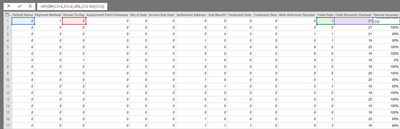
Below is an excel equivalent of what I want to do in Power Query Editor with a new Custom Column - I want to create a [Fail Ratio] which takes the sum of Fails from the Total Checks to give a percentage. Easy.
Did that using [Total Fail]/[Total Checks]
But there are two elements - [Patient Name] and [Person to Pay] where if they fail, the [Fail Ratio] should be a complete fail, irrespective of whether these are only these two fails.
So I need the measure to give complete fail if [Patient Name] or [Person to Pay]="Fail", else [Total Fail]/[Total Checks]
- Mark as New
- Bookmark
- Subscribe
- Mute
- Subscribe to RSS Feed
- Permalink
- Report Inappropriate Content
@Anonymous
Sorry I missed your last reply
You can use a custom column like
=if
List.Contains({[Patient Name],[Person To Pay]},"Fail")
then
0
else
[Total Fail]/[Total Checks]
Regards
Zubair
Please try my custom visuals
Helpful resources

Fabric Data Days 2026
Don't miss out on Data Days, June 15 through August 7. Learn Fabric, Power BI, SQL, AI and more.

Power BI DataViz World Championships - June 2026
A new Power BI DataViz World Championship is coming this June! Don't miss out on submitting your entry.

| User | Count |
|---|---|
| 23 | |
| 21 | |
| 20 | |
| 17 | |
| 11 |


| User | Count |
|---|---|
| 55 | |
| 53 | |
| 41 | |
| 36 | |
| 32 |


