cancel
Showing results for 
Search instead for 
Did you mean: 

The FabCon + SQLCon recap series starts April 14th at 8am Pacific. If you’re tracking where AI is going inside Fabric, this first session is a can't miss. Register now

Reply
thmonte
Helper IV
Helper IV

Using Date to filter over multiple tables

I have multiple tables that all have date/time values for each row in the table.  I am looking to create a report and would like to be able to filter over date/time but I do not have a table of unique values to create a relationship from.  In addition I am using DirectQuery which does not allow me to create a summarized table of unique values.  Can anyone point me in the right direction?


Thanks in advance.

1 ACCEPTED SOLUTION
Anonymous
Not applicable

@thmonte


You can make a time dimension without using summarize. Try making a new table with this:


TimeDim = CALENDAR(FIRSTDATE(Table[Date]);LASTDATE(Table[Date])).


Then you can link your tables to this new table, and slice on that. Let me know how it goes.


Best,

Martin

View solution in original post

6 REPLIES 6
RR010
Regular Visitor

Hi Guys,

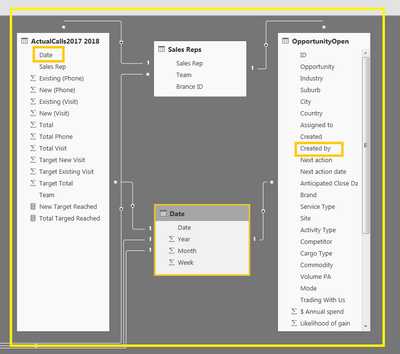
I've got a related question. I made a Date table which is working (well.. for most of the time) but I still have a problem. I'll post a print screen as well to show what is happening.
I have two tables, Actual Calls and Oppertunities, between these two I have small a Sales Rep table and a Date Table. When I make a report and filter bij Sales Rep it all works fine, when I try to filter by Date (the made date table) my Actual calls do filter but my Oppertunities dont.. I have no idea why..

Hope you can help! Thank you!


Example1.png

Anonymous
Not applicable

@thmonte


You can make a time dimension without using summarize. Try making a new table with this:


TimeDim = CALENDAR(FIRSTDATE(Table[Date]);LASTDATE(Table[Date])).


Then you can link your tables to this new table, and slice on that. Let me know how it goes.


Best,

Martin

8-8-2017 11-44-37 AM.png


Since I am using DirectQuery I am uanble to create a new table.

Anonymous
Not applicable

@thmonte,

You would need to create the summarized table that contains unique values in your source, and import the table to Power BI Desktop, then link your tables to the new table.


Regards,
Lydia

@Anonymous


Thanks for the response.  I am going to work on pulling in a table of unique values of date to create a relationship.  Now I asked this in another thread and I haven't gotten a response but it is somewhat related.  I want to use the date slicer to bring in data based on a date range between the two date columns Start Date / End Date.  If you could take a look...


https://community.powerbi.com/t5/Desktop/Filtering-within-a-date-range/m-p/227773#M101499

Anonymous
Not applicable

@thmonte,

Since you have created another thread about the date range issue, please close this thread by marking approriate reply as answer. 

The date range issue will be handled by our support engineer in your another thread.

Regards,
Lydia

Helpful resources

Announcements
New to Fabric survey Carousel

New to Fabric Survey

If you have recently started exploring Fabric, we'd love to hear how it's going. Your feedback can help with product improvements.

Power BI DataViz World Championships carousel

Power BI DataViz World Championships - June 2026

A new Power BI DataViz World Championship is coming this June! Don't miss out on submitting your entry.

Join our Fabric User Panel

Join our Fabric User Panel

Share feedback directly with Fabric product managers, participate in targeted research studies and influence the Fabric roadmap.

March Power BI Update Carousel

Power BI Community Update - March 2026

Check out the March 2026 Power BI update to learn about new features.