- Power BI forums
- Get Help with Power BI
- Desktop
- Service
- Report Server
- Power Query
- Mobile Apps
- Developer
- DAX Commands and Tips
- Custom Visuals Development Discussion
- Health and Life Sciences
- Power BI Spanish forums
- Translated Spanish Desktop
- Training and Consulting
- Instructor Led Training
- Dashboard in a Day for Women, by Women
- Galleries
- Data Stories Gallery
- Themes Gallery
- Contests Gallery
- QuickViz Gallery
- Quick Measures Gallery
- Visual Calculations Gallery
- Notebook Gallery
- Translytical Task Flow Gallery
- TMDL Gallery
- R Script Showcase
- Webinars and Video Gallery
- Ideas
- Custom Visuals Ideas (read-only)
- Issues
- Issues
- Events
- Upcoming Events
Learn from the best! Meet the four finalists headed to the FINALS of the Power BI Dataviz World Championships! Register now
- Power BI forums
- Forums
- Get Help with Power BI
- Desktop
- Using Data from One Table in Another Table
- Subscribe to RSS Feed
- Mark Topic as New
- Mark Topic as Read
- Float this Topic for Current User
- Bookmark
- Subscribe
- Printer Friendly Page

- Mark as New
- Bookmark
- Subscribe
- Mute
- Subscribe to RSS Feed
- Permalink
- Report Inappropriate Content
Using Data from One Table in Another Table
Hi,
I'm new to Power BI, and I have two table queries, and I want to take a column from one table and enter the data into another table.
I have tried using RELATED but it does not find my table, the table has a relationship, but for some reason and I don't know why I am not able to get the column I need.
Any help would be greatfully received.
Thank you!
Solved! Go to Solution.
- Mark as New
- Bookmark
- Subscribe
- Mute
- Subscribe to RSS Feed
- Permalink
- Report Inappropriate Content
@Anonymous,
In this case, I would suggest using Edit Queries to merge the two tables to get Modified column. RELATEDTABLE only works in conjuction with numeric values and aggregation, but since Modified is non-numeric column, you cannot use RELATEDTABLE
- Mark as New
- Bookmark
- Subscribe
- Mute
- Subscribe to RSS Feed
- Permalink
- Report Inappropriate Content
@Anonymous,
Have you tried RELATEDTABLE instead? RELATED is used to get data from the one side of a relationship and RELATEDTABLE is used to get data from the many side of a relationship
- Mark as New
- Bookmark
- Subscribe
- Mute
- Subscribe to RSS Feed
- Permalink
- Report Inappropriate Content
@Anonymous
Thank you for coming back to me, I am not again 100% sure on what I need to enter on RELATEDTABLE, I do get a little further with this but I think I may be putting the wrong information into the column
Screen Shot of message

Thank you
- Mark as New
- Bookmark
- Subscribe
- Mute
- Subscribe to RSS Feed
- Permalink
- Report Inappropriate Content
@Anonymous,
Can you share a screenshot of your data model?
- Mark as New
- Bookmark
- Subscribe
- Mute
- Subscribe to RSS Feed
- Permalink
- Report Inappropriate Content
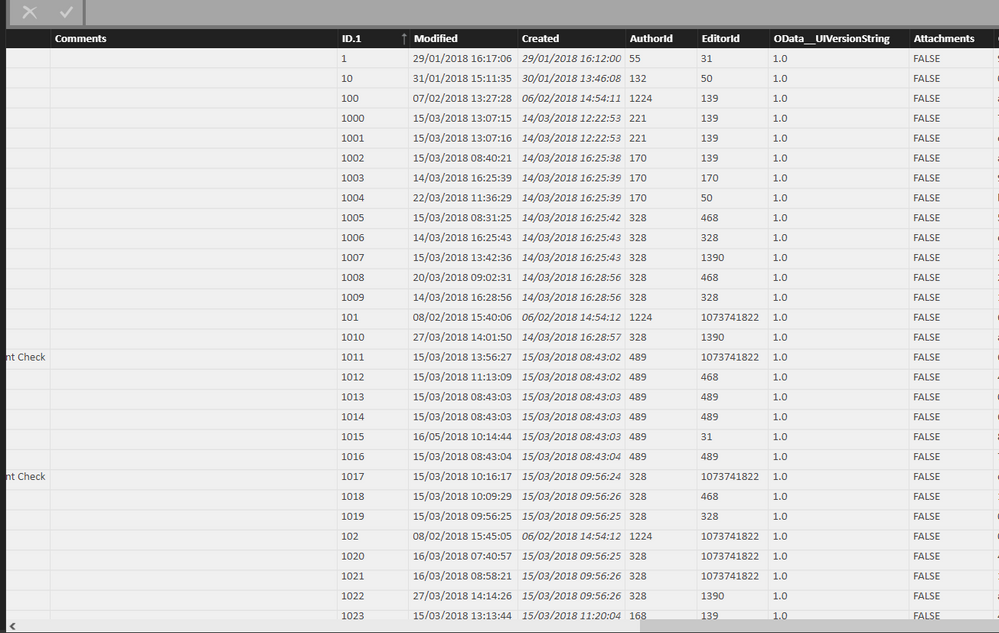
@Anonymous
Is this what you require?
I want to use the Column Modified into another data table
- Mark as New
- Bookmark
- Subscribe
- Mute
- Subscribe to RSS Feed
- Permalink
- Report Inappropriate Content
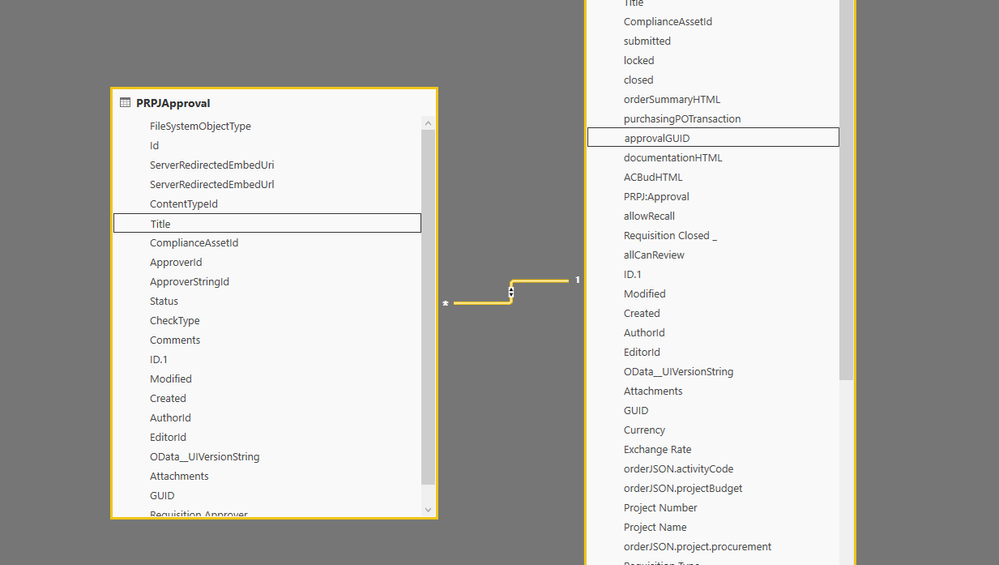
@Anonymous,
Can you also provide relationship between two tables? It will help decide whether to use RELATED, RELATEDTABLE or something else
- Mark as New
- Bookmark
- Subscribe
- Mute
- Subscribe to RSS Feed
- Permalink
- Report Inappropriate Content
@Anonymous
Screen shot of relationship as requested,
- Mark as New
- Bookmark
- Subscribe
- Mute
- Subscribe to RSS Feed
- Permalink
- Report Inappropriate Content
@Anonymous,
In this case, I would suggest using Edit Queries to merge the two tables to get Modified column. RELATEDTABLE only works in conjuction with numeric values and aggregation, but since Modified is non-numeric column, you cannot use RELATEDTABLE
Helpful resources

Power BI DataViz World Championships - June 2026
A new Power BI DataViz World Championship is coming this June! Don't miss out on submitting your entry.

Join our Fabric User Panel
Share feedback directly with Fabric product managers, participate in targeted research studies and influence the Fabric roadmap.

Power BI Community Update - March 2026
Check out the March 2026 Power BI update to learn about new features.

| User | Count |
|---|---|
| 52 | |
| 34 | |
| 34 | |
| 19 | |
| 17 |


| User | Count |
|---|---|
| 64 | |
| 64 | |
| 41 | |
| 27 | |
| 24 |


