Join us at FabCon Atlanta from March 16 - 20, 2026, for the ultimate Fabric, Power BI, AI and SQL community-led event. Save $200 with code FABCOMM.
Register now!The Power BI Data Visualization World Championships is back! Get ahead of the game and start preparing now! Learn more
Solved! Go to Solution.
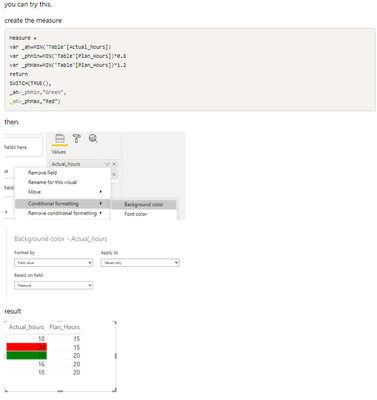
Hi @jonnyA
I have encountered a similar post before, here is the link, https://community.powerbi.com/t5/Desktop/Comparing-Column-Values-then-Conditional-Formatting-Based-O...,for your reference.
Best Regards,
Community Support Team _Tang
If this post helps, please consider Accept it as the solution to help the other members find it more quickly.
Hi @jonnyA
I have encountered a similar post before, here is the link, https://community.powerbi.com/t5/Desktop/Comparing-Column-Values-then-Conditional-Formatting-Based-O...,for your reference.
Best Regards,
Community Support Team _Tang
If this post helps, please consider Accept it as the solution to help the other members find it more quickly.
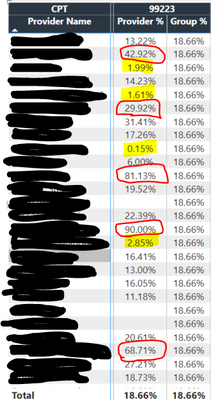
@jonnyA ,
a new color measure =
if([Provider %] >.1 && [Provider %] >[Group %], "White", "yellow")
Use this in conditional formatting using field value option
The Power BI Data Visualization World Championships is back! Get ahead of the game and start preparing now!
| User | Count |
|---|---|
| 61 | |
| 54 | |
| 41 | |
| 41 | |
| 22 |
| User | Count |
|---|---|
| 171 | |
| 136 | |
| 119 | |
| 80 | |
| 54 |