This time we’re going bigger than ever. Fabric, Power BI, SQL, AI and more. We're covering it all. You won't want to miss it.
Learn moreDid you hear? There's a new SQL AI Developer certification (DP-800). Start preparing now and be one of the first to get certified. Register now
Solved! Go to Solution.
Hi @jonnyA
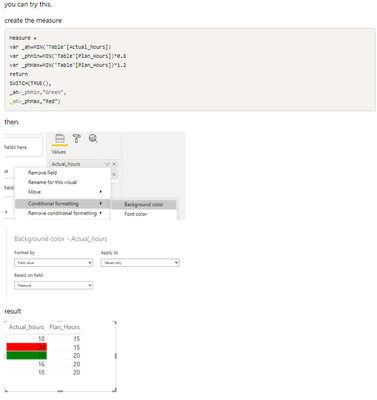
I have encountered a similar post before, here is the link, https://community.powerbi.com/t5/Desktop/Comparing-Column-Values-then-Conditional-Formatting-Based-O...,for your reference.
Best Regards,
Community Support Team _Tang
If this post helps, please consider Accept it as the solution to help the other members find it more quickly.
Hi @jonnyA
I have encountered a similar post before, here is the link, https://community.powerbi.com/t5/Desktop/Comparing-Column-Values-then-Conditional-Formatting-Based-O...,for your reference.
Best Regards,
Community Support Team _Tang
If this post helps, please consider Accept it as the solution to help the other members find it more quickly.
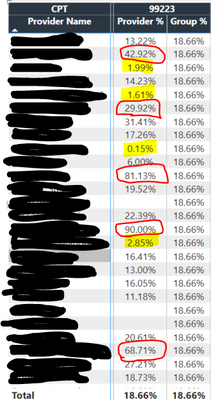
@jonnyA ,
a new color measure =
if([Provider %] >.1 && [Provider %] >[Group %], "White", "yellow")
Use this in conditional formatting using field value option
Check out the April 2026 Power BI update to learn about new features.
Sign up to receive a private message when registration opens and key events begin.
If you have recently started exploring Fabric, we'd love to hear how it's going. Your feedback can help with product improvements.
| User | Count |
|---|---|
| 34 | |
| 31 | |
| 25 | |
| 20 | |
| 16 |
| User | Count |
|---|---|
| 61 | |
| 49 | |
| 28 | |
| 23 | |
| 23 |