cancel
Showing results for 
Search instead for 
Did you mean: 

The Power BI Data Visualization World Championships is back! It's time to submit your entry. Live now!

Reply
Anonymous
Not applicable

Using COUNTROWS between a date range

Hi everyone


I have data with tickets that come in at various times, including multiple tickets on the same day. I am trying to ascertain repeat people who create tickets over the last 2 months.

I've written a column which gets pretty close, but not quite close enough, and I'm wondering how to get it over the line.

An example of my data is as follows (dates in UK format):


Created           Name               CountofNameinlast2months   

10/10/19         A.Nother          3                                                  

8/10/19           T.Lerone           1                                          

9/9/19             A.Nother          3

8/9/19             A.Nother          3

19/9/19           Mr.Tea             1

21/8/19           A.Nother          3

1/7/19             Mr.Tea             3

01/6/19           A.Nother          3


My expected output from above is the contents of the 'CountofNameinLast2months' column (assuming today is 23rd October)

As you can see I need the DAX to ignore A.Nother and Mr.Tea's tickets in June and July respectively.


I've been using COUNTROWS, because the created date will always be populated, but when I use DATESBETWEEN i get an error stating that the date column has multiple same dates, which is not supported.


Can anyone offer any assistance?


Thanks 🙂


1 ACCEPTED SOLUTION
Anonymous
Not applicable

Thanks for your help @Anonymous 


I got there myself in the end, by using the FILTER function inside the COUNTROWS, it has got me the deisred results.


Appreciate you spending the time.

View solution in original post

2 REPLIES 2
Anonymous
Not applicable

Hi @Anonymous 


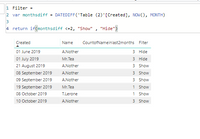
You can create a column to filter out data older than 2 months. 


Filter = 
var monthsdiff = DATEDIFF('Table (2)'[Created], NOW(), MONTH)

return if(monthsdiff <=2, "Show" , "Hide")

Capture.PNG


Anonymous
Not applicable

Thanks for your help @Anonymous 


I got there myself in the end, by using the FILTER function inside the COUNTROWS, it has got me the deisred results.


Appreciate you spending the time.

Helpful resources

Announcements
Power BI DataViz World Championships

Power BI Dataviz World Championships

The Power BI Data Visualization World Championships is back! It's time to submit your entry.

December 2025 Power BI Update Carousel

Power BI Monthly Update - December 2025

Check out the December 2025 Power BI Holiday Recap!

FabCon Atlanta 2026 carousel

FabCon Atlanta 2026

Join us at FabCon Atlanta, March 16-20, for the ultimate Fabric, Power BI, AI and SQL community-led event. Save $200 with code FABCOMM.