This time we’re going bigger than ever. Fabric, Power BI, SQL, AI and more. We're covering it all. You won't want to miss it.
Learn moreLevel up your Power BI skills this month - build one visual each week and tell better stories with data! Get started
I want to add 2 values into same Line Chart like below sample. Do you know how can do in PowerBI?
Solved! Go to Solution.
Hi @aslan,
Based on test, current line chart not support use multiple value and legend at same time.
For your requirement, you can submit it to ideas.
Regards,
Xiaoxin Sheng
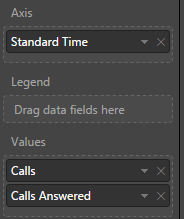
Just put both the measures on values fields and make sure there is nothing in Legend. Your date will be on Axis
Subscribe to the @PowerBIHowTo YT channel for an upcoming video on List and Record functions in Power Query!!
Learn Power BI and Fabric - subscribe to our YT channel - Click here: @PowerBIHowTo
If my solution proved useful, I'd be delighted to receive Kudos. When you put effort into asking a question, it's equally thoughtful to acknowledge and give Kudos to the individual who helped you solve the problem. It's a small gesture that shows appreciation and encouragement! ❤
Did I answer your question? Mark my post as a solution. Proud to be a Super User! Appreciate your Kudos 🙂
Feel free to email me with any of your BI needs.
Parry2k provides the correct answer for this question. Nice job!
I have to use Legend also.
Hi there
Is there already an idea that is highly rated at the moment to improve this problem?
I'm having the same problem (I also need legend and wants to add an additional target from another value).
Hi @aslan,
Based on test, current line chart not support use multiple value and legend at same time.
For your requirement, you can submit it to ideas.
Regards,
Xiaoxin Sheng
Hi, is there a solution available for this problem now?
Thanks.
Check out the April 2026 Power BI update to learn about new features.
Sign up to receive a private message when registration opens and key events begin.
If you have recently started exploring Fabric, we'd love to hear how it's going. Your feedback can help with product improvements.
| User | Count |
|---|---|
| 31 | |
| 25 | |
| 21 | |
| 18 | |
| 17 |
| User | Count |
|---|---|
| 62 | |
| 34 | |
| 33 | |
| 25 | |
| 24 |