This time we’re going bigger than ever. Fabric, Power BI, SQL, AI and more. We're covering it all. You won't want to miss it.
Learn moreDid you hear? There's a new SQL AI Developer certification (DP-800). Start preparing now and be one of the first to get certified. Register now
Hello all
I have a report with a table where my users where used to be able to export the data from.
Since I reuploaded the report a few days ago, they now cant see the option “export data” in the ellipsis menu. I just changed some names in the report…
The report is published in an app where all my users have access to. It seems that only members of the workspace can export from there. Is there a setting that was added or I have to change, I couldn’t find anything yet.
Best regards
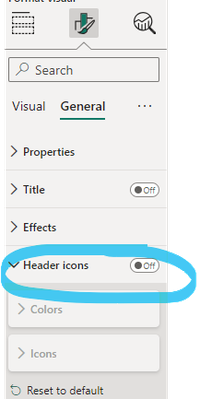
Check if Header Icons on that visual are enabled
A colleague just helped to figure it out 🙂
Hi @Anonymous ,
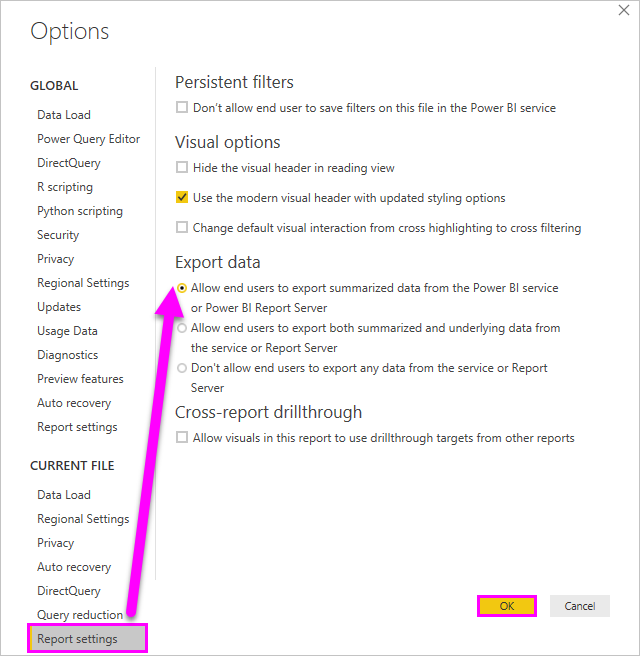
1.In Power BI Desktop. Go to File > Options and Settings > Options ,check if the Export data option is ticked correctly.
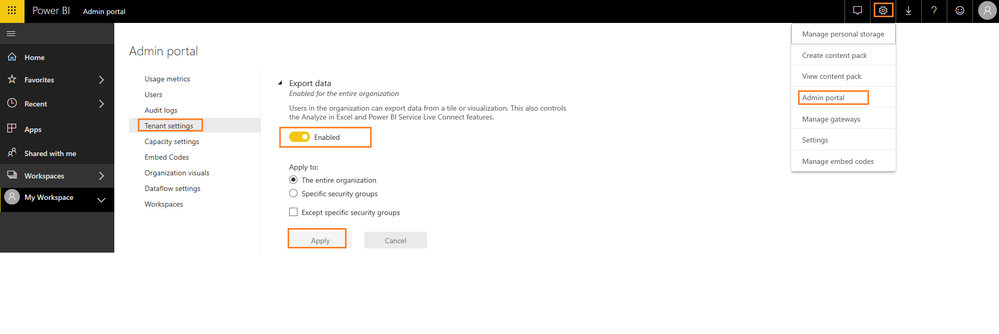
2.In Power BI Service, did the admin enable the Export data option?
3.To export the data from a visual, you need to have Build permission for the underlying dataset.
4.Custom visuals and R visuals aren't currently supported.
5.Export data isn't available for users outside of your organization who are using a dashboard that an internal user has shared with them.
For more limitation of export data feature, you can refer to :https://docs.microsoft.com/en-us/power-bi/visuals/power-bi-visualization-export-data#limitations-and-considerations.
Best Regards,
Amy
If this post helps, then please consider Accept it as the solution to help the other members find it more quickly.
Hi @v-xicai
Thanks for your detailed answer.
For my case #3 were the solution.
I saw my recently created reports all does not have the build permission given to end users, did this change? All of our older reports have this enabled. Is there a settings somewhere so that it automatically enables it?
Best regards
Check out the April 2026 Power BI update to learn about new features.
Sign up to receive a private message when registration opens and key events begin.
If you have recently started exploring Fabric, we'd love to hear how it's going. Your feedback can help with product improvements.
| User | Count |
|---|---|
| 36 | |
| 33 | |
| 31 | |
| 21 | |
| 16 |
| User | Count |
|---|---|
| 66 | |
| 55 | |
| 31 | |
| 24 | |
| 23 |